Snowflake Integration
Query data, browse metadata, read/write stages, and write DataFrames to tables in Snowflake -- all using Fused-managed OAuth tokens. No passwords or credentials are stored client-side.
Prerequisites
Connect your Snowflake account to Fused
A Snowflake administrator runs a few one-time SQL commands in Snowflake (Steps 1–4), then you complete an OAuth flow in the Fused workbench (Step 5).
Using the Snowflake integration outside of Workbench?
If you're running Fused locally (outside the Workbench), install the Snowflake extras first:
pip install fused[snowflake]
This adds snowflake-connector-python alongside the core fused package. In the Workbench this is already pre-installed.
Step 1 -- Create a security integration:
CREATE SECURITY INTEGRATION fused_oauth
  TYPE = OAUTH
  OAUTH_CLIENT = CUSTOM
  OAUTH_CLIENT_TYPE = 'CONFIDENTIAL'
  OAUTH_REDIRECT_URI = 'https://www.fused.io/server/v1/integrations/snowflake/callback'
  ENABLED = TRUE;
Replace the domain in OAUTH_REDIRECT_URI with your Fused deployment's origin if you are not on www.fused.io. The path must always be /server/v1/integrations/snowflake/callback.
Step 2 -- Retrieve the client ID and secret:
SELECT SYSTEM$SHOW_OAUTH_CLIENT_SECRETS('FUSED_OAUTH');
This returns a JSON object. Copy the OAUTH_CLIENT_ID, OAUTH_CLIENT_SECRET, and OAUTH_CLIENT_SECRET_2 values -- you'll paste them into the Fused UI in the last step.
Step 3 -- Create a role with warehouse usage:
CREATE ROLE FUSED_WH_ROLE;
GRANT USAGE ON WAREHOUSE COMPUTE_WH TO ROLE FUSED_WH_ROLE;
Step 4 -- Create a dedicated service account user and grant it the role:
CREATE USER fused_service_account
  TYPE = PERSON
  LOGIN_NAME = 'fused_service_account'
  DISPLAY_NAME = 'Fused Service Account'
  DEFAULT_ROLE = FUSED_WH_ROLE
  DEFAULT_WAREHOUSE = COMPUTE_WH
  MUST_CHANGE_PASSWORD = FALSE
  PASSWORD = 'xxxxx';

GRANT ROLE FUSED_WH_ROLE TO USER fused_service_account;
Do not sign in with an administrator account during the OAuth step. Snowflake blocks ACCOUNTADMIN and SECURITYADMIN for custom OAuth integrations, which is why a dedicated service account user is required.
Step 5 -- Connect in Workbench:
-
Enable the Snowflake integration feature flag in Preferences > Experimental Features.
-
Open Settings > Integrations and click Connect Snowflake.
-
Enter your account identifier (e.g.
ORGNAME-ACCTNAME), theOAUTH_CLIENT_ID, both client secrets, and optionally a role.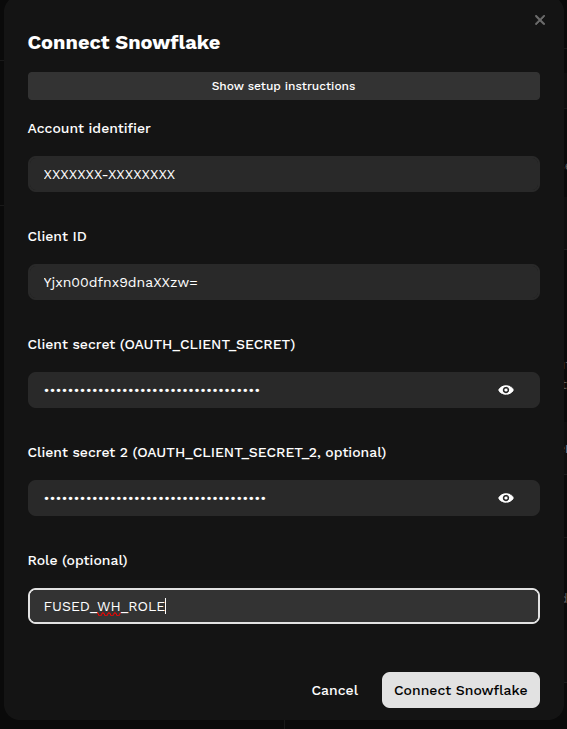
-
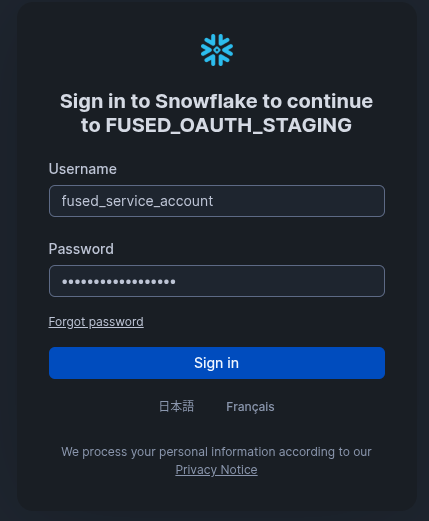
A Snowflake sign-in popup will open. Sign in with the service account user you created in Step 4 (not an administrator account) to complete the OAuth flow.
-
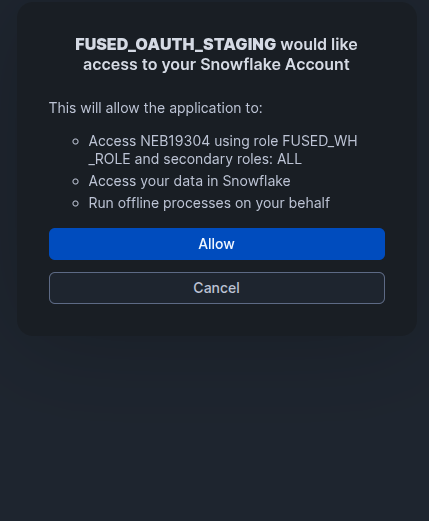
Click Allow on the OAuth consent screen to grant Fused access to your Snowflake account.
Examples
Query Snowflake in a UDF
@fused.udf
def udf():
    import fused.api

    df = fused.api.snowflake_query(
        "SELECT * FROM my_db.my_schema.my_table LIMIT 10"
    )
    return df
Use a connection for multiple operations
@fused.udf
def udf():
    import fused.api

    conn = fused.api.snowflake_connect(
        warehouse="COMPUTE_WH",
        database="ANALYTICS",
        schema="PUBLIC",
        role="ANALYST",
    )

    print("Tables:", conn.list_tables("ANALYTICS", "PUBLIC"))

    sales = conn.query("""
        SELECT region, SUM(amount) AS total
        FROM orders
        WHERE order_date >= '2025-01-01'
        GROUP BY region
        ORDER BY total DESC
    """)
    return sales
Write results back to Snowflake
@fused.udf
def udf():
    import fused.api
    import pandas as pd

    conn = fused.api.snowflake_connect(
        warehouse="COMPUTE_WH",
        database="ANALYTICS",
        schema="PUBLIC",
    )

    df = pd.DataFrame({"id": [1, 2, 3], "value": [10.5, 20.3, 30.1]})
    conn.write(df, "ANALYTICS.PUBLIC.METRICS", mode="overwrite")
    return df
Read from a Snowflake stage
@fused.udf
def udf():
    import fused.api

    conn = fused.api.snowflake_connect(
        warehouse="COMPUTE_WH",
        database="RAW_DATA",
        schema="INGEST",
    )

    files = conn.list_stage_files("@csv_stage", pattern=".*[.]csv")
    if files:
        df = conn.read_stage(f"@csv_stage/{files[0].split('/')[-1]}")
        return df
For full API details, see the Snowflake section of the fused.api reference.
How it works
Fused manages the full OAuth token lifecycle on your behalf. Your Snowflake credentials never leave the Fused server -- the SDK only receives short-lived access tokens, which it uses to connect directly to Snowflake.