Efficient caching
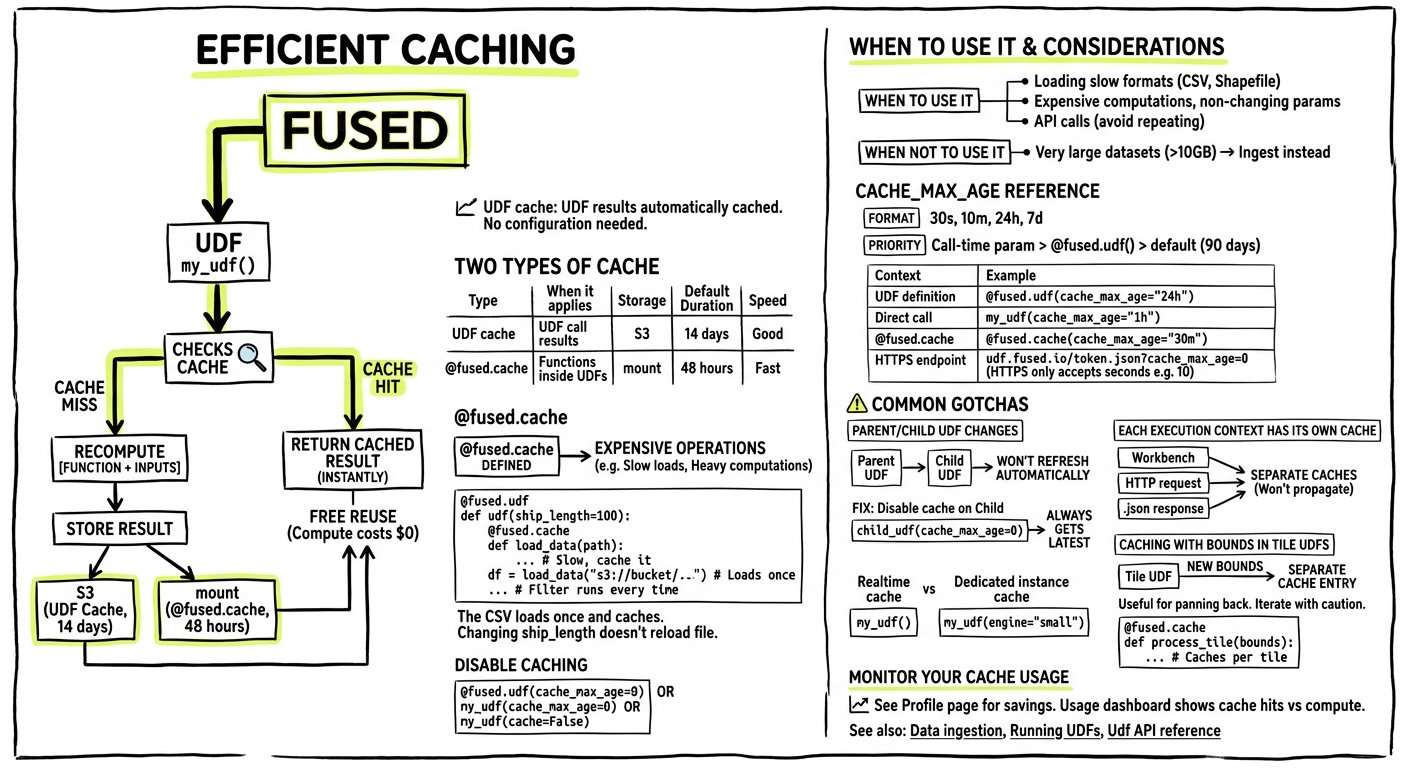
Fused caches UDF results automatically to make repeated calls faster. Cached calls return instantly and don't consume Fused Credit Units—you only pay for compute once, then reuse the result for free.
Two types of cache
| Type | When it applies | Storage | Default Duration | Speed |
|---|---|---|---|---|
| UDF cache | UDF call results | S3 | 14 days | Good |
@fused.cache | Functions inside UDFs | mount | 48 hours | Fast |
Both work the same way: store the result of [function + inputs], return cached result on repeat calls. Change the function or inputs → cache miss → recompute.
UDF cache
Every UDF call is cached automatically. No configuration needed.
The UDF cache is hosted in us-west-2. If your users are outside the US, expect a small amount of added latency (~1–2s) for cached responses due to the geographic round trip.
# doctest: skip
my_udf()  # First call: runs UDF
my_udf()  # Second call: returns cached result
Disable caching when you need fresh results:
@fused.udf(cache_max_age=0)
def my_udf():
    ...

# Or at call time
my_udf(cache_max_age=0)
# or
my_udf(cache=False)
@fused.cache
Use @fused.cache for expensive operations inside a UDF—loading slow file formats, heavy computations that repeat across runs.
@fused.udf
def udf(ship_length: int = 100):

    @fused.cache
    def load_data(path):
        import pandas as pd
        return pd.read_csv(path)  # Slow format, cache it

    df = load_data("s3://bucket/large_file.csv")
    return df[df.Length > ship_length]
The CSV loads once and caches. Changing ship_length doesn't reload the file—only changing the path would.
When to use it:
- Loading CSV, Shapefile, or other slow formats
- Expensive computations that don't depend on all UDF parameters
- API calls you don't want to repeat
When NOT to use it:
- Very large datasets (>10GB)—consider ingesting to cloud-native formats instead
cache_max_age reference
Control how long cached results stay valid.
Format: 30s (seconds), 10m (minutes), 24h (hours), 7d (days)
Where you can set it:
| Context | Example |
|---|---|
| UDF definition | @fused.udf(cache_max_age="24h") |
| Direct call | my_udf(cache_max_age="1h") |
| @fused.cache | @fused.cache(cache_max_age="30m") |
| HTTPS endpoint | udf.fused.io/token.json?cache_max_age=0 |
The endpoint accepts seconds as a number (e.g. cache_max_age=10). Python accepts human-readable formats like 10s, 10m, 24h.
Priority: Call-time param > @fused.udf() > default (90 days)
Common gotchas
Parent/child UDF changes
When calling one UDF from another, the child won't automatically refresh when the parent changes:
@fused.udf
def child_udf():
    parent = fused.load("parent_udf")
    data = parent()  # Won't re-fetch if parent changes
    return data
Fix: disable cache on the child so it always calls the parent:
@fused.udf(cache_max_age=0)
def child_udf():
    parent = fused.load("parent_udf")
    data = parent()  # Always gets latest from parent
    return data
Invalidate cache
You can invalidate the UDF cache programmatically — including purging specific tiles. See Cache invalidation for details.
@fused.cache is shared across UDFs
If two UDFs define the same cached function — identical source code, called with the same arguments — the second will reuse the cached result from the first instead of recomputing. This is because the cache key is based on function source code and call arguments, not on which UDF the function belongs to. Here's an example:
UDF 1
@fused.udf
def udf():
    import pandas as pd

    @fused.cache
    def cached_sleep():  # identical source → same cache key
        import time
        time.sleep(5)

    cached_sleep()  # populates the cache on first run
    return pd.DataFrame({"hello": ['world']})
UDF 2
@fused.udf
def udf(name: str = "world"):
    import pandas as pd

    @fused.cache
    def cached_sleep():  # identical source → hits UDF 1's cache entry
        import time
        time.sleep(5)

    cached_sleep()  # returns instantly if UDF 1 ran first
    return pd.DataFrame({"hello": [name]})
Any change to function source — a comment, print statement, or different call arguments — produces a different hash and causes a cache miss.
To avoid accidental cache sharing, use distinct function names:
@fused.cache
def cached_sleep_udf1():
    ...

@fused.cache
def cached_sleep_udf2():
    ...
Realtime vs dedicated instance have separate caches
# doctest: skip
my_udf()                     # realtime cache
my_udf(engine="small")       # different cache (dedicated instance)
Caching with bounds in Tile UDFs
When using Tile UDFs, panning the map triggers new UDF calls with different bounds. If you cache a function that takes bounds as input, each tile creates a separate cache entry.
This can be useful: Pan back to a previously viewed area and the cached tiles load instantly.
Watch out for: If you're iterating on code, you may accumulate many cache entries. Consider what actually needs to vary with bounds:
# Caches per tile - good for expensive tile-specific operations
@fused.cache
def process_tile(bounds):
    ...

# Caches once - better when data doesn't depend on bounds
@fused.cache
def load_data(path):
    return gpd.read_file(path)

gdf = load_data(path)
return gdf[gdf.geometry.intersects(bounds_geom)]  # Filter after
Monitor your cache usage
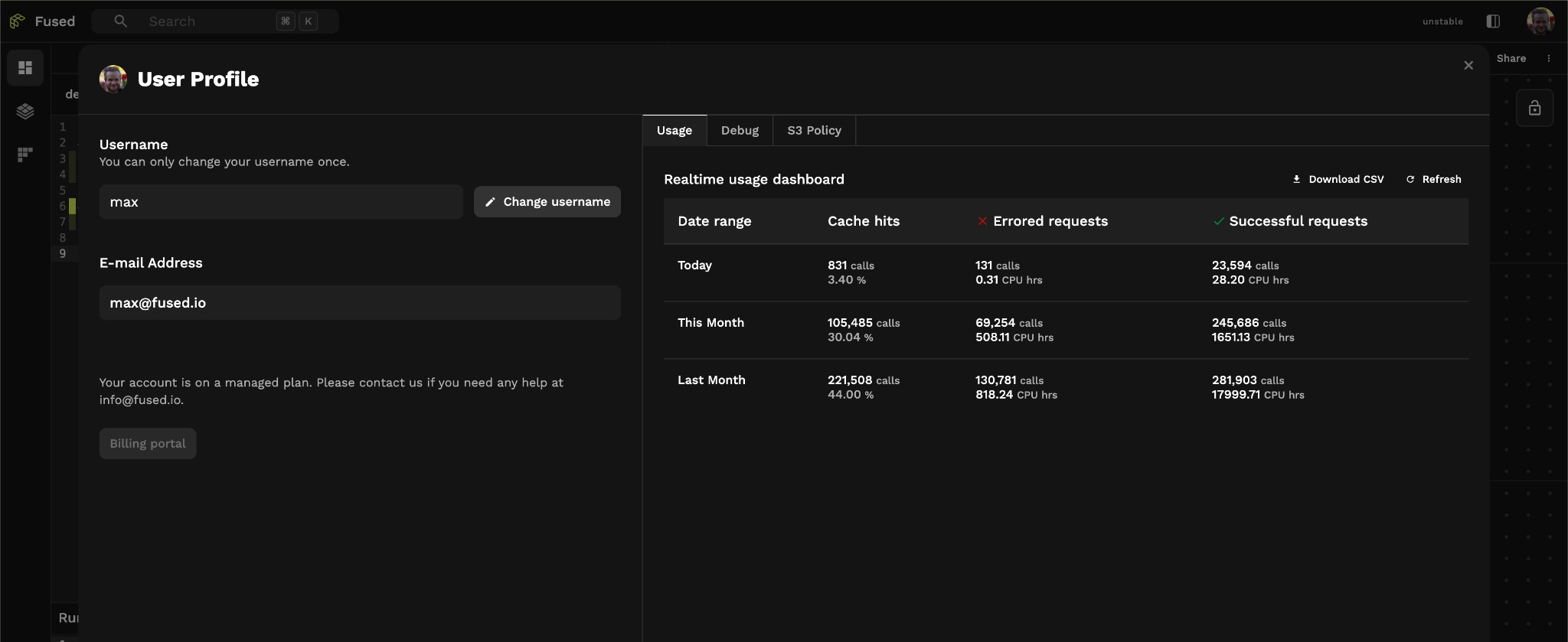
See how much caching is saving you in the Profile page in Workbench. The usage dashboard shows cache hits vs actual compute across different time ranges.
See also
- Cache invalidation — purge cached results via Python or the HTTP API
- Data ingestion — for large datasets, ingest to Parquet/GeoParquet instead of caching
- Running UDFs — calling UDFs
UdfAPI reference — full API details