UDFs as API
Every UDF can be used as a file system.
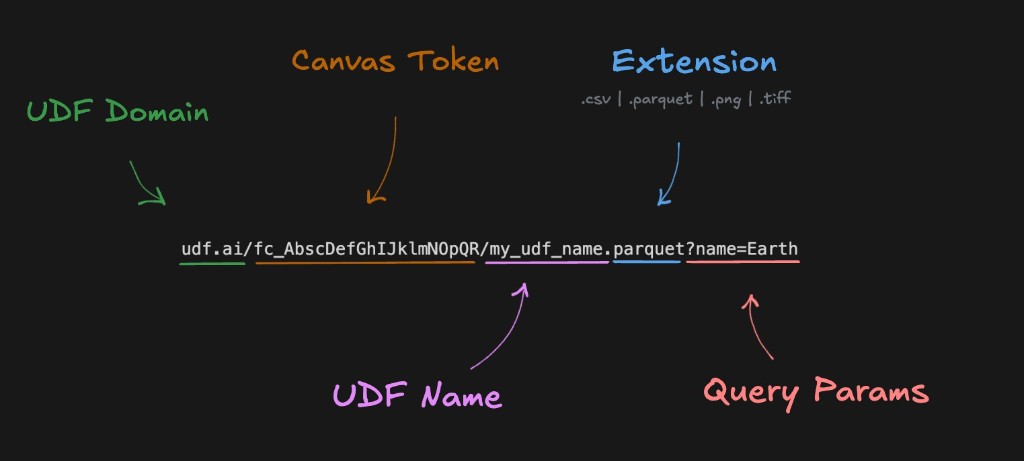
Share your canvas to get a canvas token (fc_***); then call any UDF by name.
Output formats
UDFs can return data in various formats via the format query parameter:
Vector data formats
| Format | Extension | Description |
|---|---|---|
parquet | .parquet | Efficient columnar storage format |
geojson | .geojson | Standard GeoJSON format |
json | .json | JSON objects and GeoJSON |
csv | .csv | Comma-separated values |
mvt | .mvt | Mapbox Vector Tiles |
feather | .feather | Apache Arrow IPC format |
excel | .xlsx | Excel spreadsheet |
xml | .xml | XML data |
html | .html | HTML document |
Raster data formats
| Format | Extension | Description |
|---|---|---|
png | .png | Lossless raster images |
jpeg | .jpeg / .jpg | Compressed raster images |
gif | .gif | Animated or static images |
webp | .webp | Modern efficient image format |
apng | .apng | Animated PNG images |
svg | .svg | Scalable vector graphics |
tiff | .tiff / .tif | GeoTIFF and TIFF rasters |
npy | .npy | NumPy array binary format |
Example usage
Use your canvas token and UDF name (from sharing your canvas):
Returning as JSON
https://udf.ai/fc_<CANVAS_TOKEN>/my_udf.json
Returning as CSV
https://udf.ai/fc_<CANVAS_TOKEN>/my_udf.csv
Returning as HTML
https://udf.ai/fc_<CANVAS_TOKEN>/my_udf.html
Tile endpoints
For map tile servers, use the tiles path with {z}/{x}/{y} template:
Vector tiles (MVT)
https://udf.ai/fc_<CANVAS_TOKEN>/my_udf/run/tiles/{z}/{x}/{y}?=mvt
Layer Name
When consuming Fused MVT tiles in tools that require a source-layer name (like Mapbox GL JS, MapLibre, or react-map-gl), the layer is always named udf.
Raster tiles (PNG)
https://udf.ai/fc_<CANVAS_TOKEN>/my_udf/run/tiles/{z}/{x}/{y}?=png
Integrations
These dynamic endpoints work with:
- DeckGL - Interactive maps
- Mapbox - Web maps
- QGIS - Desktop GIS
- Felt - Collaborative mapping
- Google Sheets - Spreadsheet import
UDF name in the URL
If you rename a UDF in Workbench, the API URL changes — the old URL (with the previous name) will no longer work. Update any clients or bookmarks that call the UDF by URL.