Turn your data into an API
- In Workbench create a new UDF that returns data, for example:
@fused.udf
def udf():
    import pandas as pd
    path = "s3://fused-sample/demo_data/housing/housing_2024.csv"
    housing = pd.read_csv(path)
    housing['price_per_area'] = round(housing['price'] / housing['area'], 2)

    return housing[['price', 'price_per_area']]
- Share your canvas to get a canvas token
- Select the UDF, click the three dots → Open in… → Share link
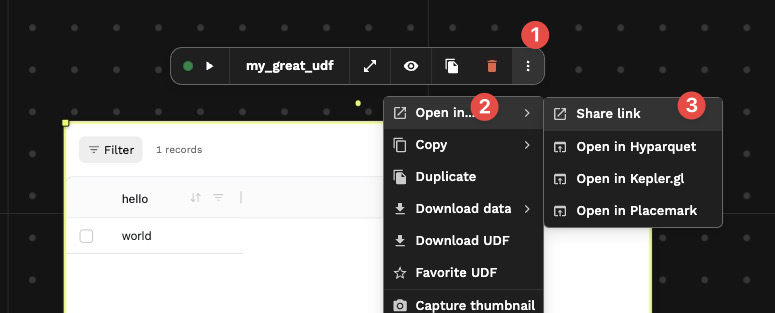
Optionally, edit the URL for your preferred format, .json, .csv, etc. (see Calling UDFs as API):
https://udf.ai/fc_YOUR_CANVAS_TOKEN/my_udf.json
https://udf.ai/fc_YOUR_CANVAS_TOKEN/my_udf.csv
HTTPS Requests
You can call saved UDFs via HTTPS. Sharing is at the canvas level: one token per canvas, UDFs referred to by name.
Canvas token
After you share your canvas, you get a canvas token (e.g. fc_**********). The share link you copy contains this token — it’s the fc_... segment. Every UDF on that canvas is then available at:
https://udf.ai/fc_<CANVAS_TOKEN>/<udf_name>.<extension>
Use the UDF name as it appears on the UDF card in Workbench.
Example:
https://udf.ai/fc_AbcDef123/my_udf.parquet
https://udf.ai/fc_AbcDef123/my_udf.json
View and manage legacy shared tokens here.
If you rename a UDF in Workbench, the old URL (with the previous name) stops working. Update any clients or bookmarks that use that URL.
Legacy: per-UDF token (fsh_)
Per-UDF shared tokens (fsh_***) are still supported but legacy. They look like fsh_**********h4t and map one token to one UDF:
https://udf.ai/fsh_YOUR_TOKEN.parquet
Existing fsh_ tokens continue to work. For new sharing, use the canvas token flow above.
Passing Parameters
You can pass parameters to your UDF via the URL by adding query parameters (¶m=value) to the URL.
For example a UDF that takes lat and lon as parameters:
@fused.udf
def udf(lat, lon):
    return pd.DataFrame({'lat': [lat], 'lon': [lon]})
Could be called with:
https://udf.ai/fc_YOUR_CANVAS_TOKEN/my_udf?lat=37.7749&lon=-121.4194
See Calling UDFs as API for more details.
Tiling
You can integrate your UDF as a vector or raster tile server by adding tiles path parameter, followed by templated /{z}/{x}/{y} path parameters.
You need to make sure:
- Your UDF is set to Tile mode
- You properly pass
/{z}/{x}/{y}instead of default value - Depending on your server type, you might need to add the
formatparameter
https://udf.ai/fc_YOUR_CANVAS_TOKEN/my_udf/run/tiles/{z}/{x}/{y}?=png
Private Token
Calling UDFs with Bearer authentication requires an account's private token.
curl -XGET "https://udf.ai/fc_YOUR_CANVAS_TOKEN/my_udf.png" -H "Authorization: Bearer $ACCESS_TOKEN"
Do not share your Bearer token with anyone. These allow to impersonate your account and should be treated as such.
Serialization Format
See the full list of supported formats in Calling UDFs as API Output Formats.
Calling UDFs without Python SDK
You can run a UDF directly via HTTP request without needing Python when making the call.
1. Get your Bearer token
First retrieve your bearer token (this requires Python once):
from fused._auth import AUTHORIZATION
AUTHORIZATION.credentials.access_token
Returns something like: 'eyJ4K9pL2Mx...'
2. Find your client ID
Basic Tier (no environment): Use basic-tier as your client_id.
With environment: In Workbench, go to "Preferences" and note the "Kernel" name displayed.
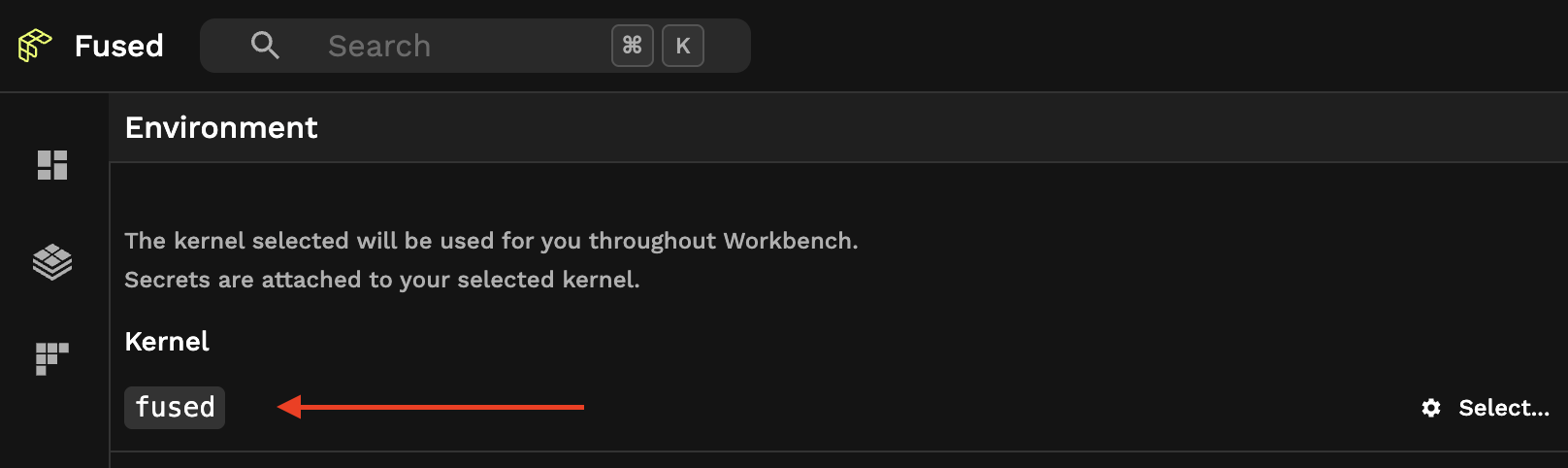
3. Make the POST request
curl -X 'POST' \
  'https://www.fused.io/server/v1/realtime/<your-client-id>/api/v1/run/udf' \
  -H 'accept: application/json' \
  -H 'Authorization: Bearer <BEARER_TOKEN_GOES_HERE>' \
  -H 'Content-Type: application/json' \
  -d '{"step_config":"{\"type\":\"udf\",\"udf\":{\"type\":\"geopandas_v2\",\"name\":\"my_udf\",\"entrypoint\":\"udf\",\"parameters\":{},\"metadata\":{},\"code\":\"@fused.udf\\ndef udf(name: str = \\\"world\\\"):\\n    import pandas as pd\\n    return pd.DataFrame({\\\"hello\\\": [name]})\\n\",\"headers\":[]}}","dtype_in":"json","format":"geojson,png","cache":true}'
Substitute the client ID from step 2 for <your-client-id> — basic-tier on the basic tier, or your kernel name if you have an environment.
Caching Responses
If a UDF's cache is enabled, its endpoints cache outputs for each combination of code and parameters. The first call runs and caches the UDF, and subsequent calls return cached data.
Control cache behavior with the cache_max_age parameter:
https://udf.ai/fc_YOUR_CANVAS_TOKEN/my_udf.json?cache_max_age=1d
See Caching for more details.