Airtable Integration
Read and write Airtable records from Fused UDFs by connecting to your Airtable account in Fused.
Prerequisites
- A Fused account on a paid plan and an Airtable account.
Setup
1. Enable the feature flag
In the Fused workbench, open Settings > Experimental Features and toggle Airtable integration on.
2. Connect your Airtable account
- Open Settings > Integrations & Secrets, find the Airtable section, and click Connect.
- You will be redirected to Airtable to authorize access. During this flow you can grant access to all bases or select specific bases.
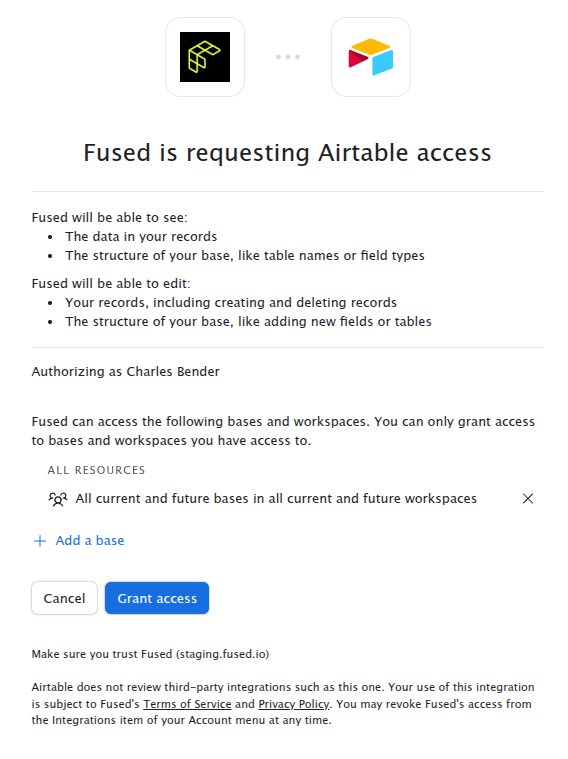
- Once you confirm, you will be redirected back to the workbench.
Finding your base ID
Every Airtable base has an ID that starts with app. To find it:
- Open the base in the Airtable web app.
- Look at the URL — it follows the pattern
https://airtable.com/appXXXXXXXXXXXXXX/.... TheappXXXXXXXXXXXXXXsegment is your base ID.
Alternatively, after connecting, you can list all accessible bases programmatically as shown below in the examples section.
Examples
List bases
@fused.udf()
def udf():
    import fused

    at = fused.api.airtable_connect()
    bases = at.list_bases()
    for base in bases:
        print(base["id"], base["name"])
Read records
Use list_records to read all records from a table. It automatically paginates through all pages. Extra keyword arguments are forwarded as query parameters to the Airtable List Records endpoint.
@fused.udf()
def udf():
    import fused
    import pandas as pd

    at = fused.api.airtable_connect(base_id="appXXXXXXXXXXXXXX")
    records = at.list_records(
        "Tasks",
        view="Grid view",
        filterByFormula="{Status} = 'Done'",
        maxRecords=100,
    )

    rows = [{"id": r["id"], **r["fields"]} for r in records]
    return pd.DataFrame(rows)
Create records
Use create_records to insert new rows. Each record should be a dict with a "fields" key. Airtable allows up to 10 records per request.
@fused.udf()
def udf():
    import fused

    at = fused.api.airtable_connect(base_id="appXXXXXXXXXXXXXX")
    created = at.create_records("Tasks", [
        {"fields": {"Name": "Buy groceries", "Status": "Todo"}},
        {"fields": {"Name": "Write docs", "Status": "In Progress"}},
    ])
    for r in created:
        print(r["id"])
Update records
Use update_records to patch existing records (PATCH semantics — only the specified fields are changed). Each record must include an "id" and a "fields" dict.
@fused.udf()
def udf():
    import fused

    at = fused.api.airtable_connect(base_id="appXXXXXXXXXXXXXX")
    at.update_records("Tasks", [
        {"id": "recXXXXXXXXXXXXXX", "fields": {"Status": "Done"}},
    ])
Delete records
Use delete_records to remove records by ID. Airtable allows up to 10 record IDs per request.
@fused.udf()
def udf():
    import fused

    at = fused.api.airtable_connect(base_id="appXXXXXXXXXXXXXX")
    at.delete_records("Tasks", ["recAAAAAAAAAAAA", "recBBBBBBBBBBBB"])
Disconnecting
To revoke the integration, go to Settings > Integrations & Secrets, find the Airtable section, and click Disconnect.