Write UDFs securely
Fused UDFs are flexible, but callers and shared links should be treated with the same care as any public API. The sections below cover secrets, parameters, SQL, paths, and optional canvas passcodes. For public vs team-only sharing, session tokens, and HTTPS access rules, see Securing shared tokens.
Use secrets
Never put passwords or API keys in UDF source. Add them in secrets management, then read them at runtime (for Snowflake, set names like SNOWFLAKE_USER and SNOWFLAKE_PASSWORD there—see the Snowflake integration guide).
Do not: hardcode credentials
Do not put real passwords or keys in UDF source. Anyone with repo or UDF access can read them, and they leak in logs and diffs.
@fused.udf
def udf():
  import snowflake.connector

  conn = snowflake.connector.connect(
      user="janedoe",
      password="do-not-commit-this",
      account="xy12345",
      warehouse="COMPUTE_WH",
      database="MY_DB",
      schema="PUBLIC",
  )
  return conn.cursor().execute("SELECT 1").fetchone()
Do: load secrets from secrets management
Read secrets at runtime with fused.secret("NAME") or fused.secrets["NAME"] so values stay out of source control.
@fused.udf
def udf():
    import snowflake.connector
    import pandas as pd

    conn = snowflake.connector.connect(
        user=fused.secrets["SNOWFLAKE_USER"],
        password=fused.secrets["SNOWFLAKE_PASSWORD"],
        account="your_account_identifier",
        warehouse="your_warehouse",
        database="your_database",
        schema="your_schema",
    )
    cursor = conn.cursor()
    cursor.execute("SELECT CURRENT_VERSION()")
    df = cursor.fetch_pandas_all()
    cursor.close()
    conn.close()
    return df
Outputs, logs, and environment
Use fused.secrets only inside the UDF (for example to open connections). Do not return or print those values.
print statements are also returned to users — Anything you print is also shown to the user as run logs. Treat it like return: never print tokens, secret values, full request headers, or anything you would not return.
Secrets and environment variables — Do not expose the secrets or environment variables: avoid returning or printing os.environ, listing every variable, or similar. Environment variables can include cloud credentials and Fused-managed secrets.
Narrow parameters
Design the UDF API so callers cannot widen what the code reads or how it queries.
| Prefer | Avoid |
|---|---|
Typed arguments (limit: int, state: str) | Raw SQL strings from callers |
| A fixed path or table inside the UDF for one-off pipelines | A generic path or sql parameter (hard to validate, cache, and reason about) |
Explicit options (columns, order_by chosen from a small set) | Free-form fragments spliced into queries |
| Serializable data (JSON, CSV, numbers, …) | Untrusted pickle; eval / exec / compile on caller input |
Don’t run caller-supplied code
Parameters should be data, not code from callers.
pickle.load/pickle.loadson untrusted bytes can execute arbitrary code. Do not unpickle caller-controlled input (or unvetted files).eval/exec/compileon caller-supplied strings — Never. Same for other “run this string as code” patterns.
DuckDB / SQL patterns
- Values (IDs, filters, …) — Don’t drop them into the SQL with an f-string or
+. Write?where each value goes, then pass the real values in a list:con.execute("... WHERE x = ?", [value]). DuckDB treats those as plain data, not as extra SQL. For paths, fix or strictly validate them—see Do not expose the data source as a parameter. - Column or table names — You can’t use
?for names—only for values. Pick allowed names in code (e.g. a Pythonset), reject anything else, then build the small part of the query that contains the name.
(Same pattern in other databases; syntax may differ.)
Anti-pattern:
@fused.udf
def udf(user_id: str = "abc"):
  import duckdb

  path = "s3://bucket/data.parquet"
  con = duckdb.connect()
  return con.execute(
      f"SELECT * FROM read_parquet('{path}') WHERE id = '{user_id}'"
  ).df()
Safe:
@fused.udf
def udf(data_type: str = "type_a"):
    import duckdb

    path = "s3://bucket/data.parquet"
    con = duckdb.connect()
    return con.execute(
        "SELECT * FROM read_parquet(?) WHERE data_type = ?",
        [path, data_type],
    ).df()
Column name from an allowed list:
@fused.udf
def udf(column: str = "data_type"):
    import duckdb

    path = "s3://bucket/data.parquet"
    con = duckdb.connect()
    allowed = {"hex", "data_type", "count"}
    if column not in allowed:
        raise ValueError("Unsupported column")
    query = f'SELECT "{column}" FROM read_parquet(?)'
    return con.execute(query, [path]).df()
Do not expose the data source as a parameter
Prefer fixing file paths and table names in the UDF body instead of taking them as arguments. That narrows what the UDF can access and keeps behavior predictable.
A path or URL argument lets callers redirect reads to any object your runtime can reach (another bucket, a different tenant’s prefix, local files, etc.) unless you maintain a strict allowlist—which is easy to get wrong. Workbench does not treat path-like parameters as overridable run arguments by default, to reduce accidental or malicious path substitution. Use fixed locations in code for normal UDFs; the looser path example below is only for intentional shared utilities.
Looser surface area — path as a parameter (reasonable only for a reusable “preview any file”–style tool):
@fused.udf
def preview_parquet(path: str, number_rows_to_preview: int = 10):
    import duckdb

    con = duckdb.connect()
    return con.execute(
        "SELECT * FROM read_parquet(?) LIMIT ?",
        [path, number_rows_to_preview],
    ).df()
Tighter surface area — path fixed inside the UDF:
@fused.udf
def udf(number_rows_to_preview: int = 10):
    import duckdb

    path = "s3://fused-users/fused/my-user/my_file.parquet" # change to your own path
    con = duckdb.connect()
    return con.execute(
        "SELECT * FROM read_parquet(?) LIMIT ?",
        [path, number_rows_to_preview],
    ).df()
Predictable inputs improve safety and caching.
Canvas access and shared tokens
How public and team-only canvas sharing work, when to split UDFs across canvases, and how session tokens (Workbench or service account) apply to UDF URLs are documented in Securing shared tokens.
Protect endpoints with Canvas passcode
You can require a canvas-wide passcode in Canvas settings so viewers must enter it before the canvas loads. Canvas passcode is only available for canvases that are shared publicly (not team-only). UDFs on those canvases use the same protection when called through shared links.
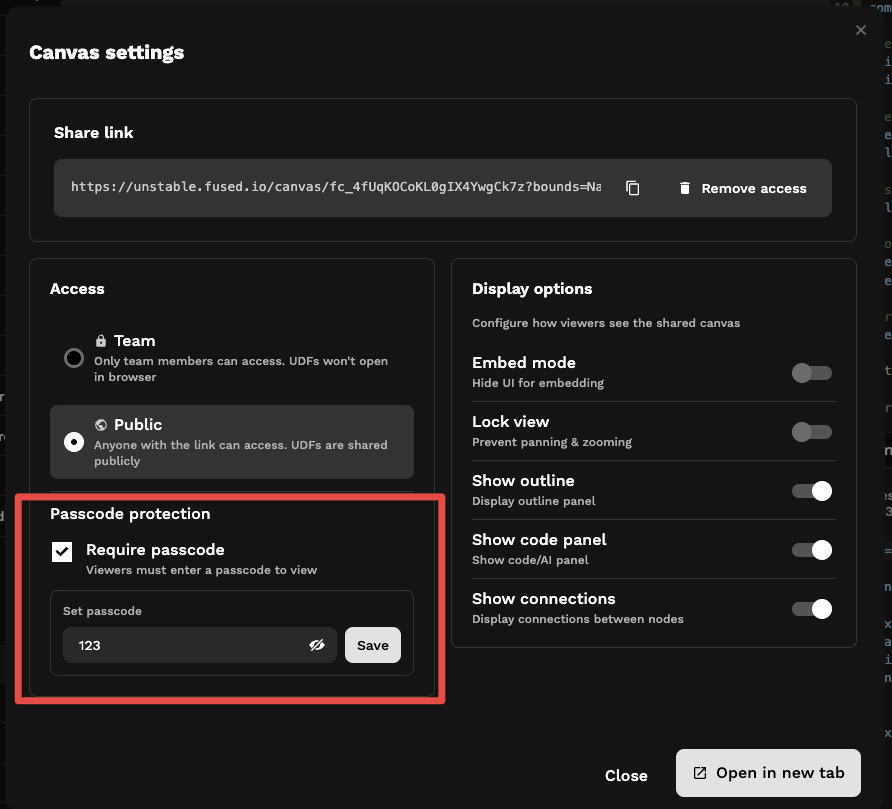
Accessing Canvas with passcode
Anyone who opens the shared canvas link is prompted for the passcode before the canvas loads.
Accessing UDFs with passcode
Opening a UDF as an API requires sending the passcode in an Authorization header:
Curl request:
curl -s \
  -H 'authorization: fused-canvas-passcode <YOUR_PASSCODE>' \
  "https://udf.ai/<YOUR_CANVAS_TOKEN>/my_udf.json"
Python request:
import requests

response = requests.get(
    "https://udf.ai/<YOUR_CANVAS_TOKEN>/my_udf.json",
    headers={"authorization": "fused-canvas-passcode <YOUR_PASSCODE>"}
)
See also
- Securing shared tokens — public vs team-only, session tokens, service accounts
- Shared Tokens
- Secrets Management
- Amazon S3 integration — connect S3 buckets, including SSE-KMS encrypted buckets