Scaling Out UDFs
When realtime isn't enough: run many jobs in parallel, or run on a dedicated machine with more resources.
Choosing your approach
| Your situation | Use |
|---|---|
| Many inputs (files, dates, regions) | Parallel execution |
| Single job needs >120s or >10GB RAM | Dedicated instance |
| Many heavy jobs | Combining both |
Parallel execution
Use .map() to run a UDF over multiple inputs in parallel, spinning up separate instances for each job.
# doctest: skip
@fused.udf
def my_udf(x: int):
    return x ** 2

inputs = [0, 1, 2, 3, 4]
pool = my_udf.map(inputs)
results = pool.df()
For the full API reference, see udf.map().
Start small, then scale
Don't immediately spin up 1000 jobs. Test progressively:
# doctest: skip
# First test with 5 inputs
pool = my_udf.map(inputs[:5])

# Then 10, then 50, then scale up
pool = my_udf.map(inputs[:50])
Target 30-45s per job
Each parallel job has a 120s timeout. Aim for 30-45s per job to leave safety margin for slower runs.
If your jobs consistently hit the timeout, either:
- Break them into smaller chunks
- Use a dedicated instance type
Check timing
Monitor how long each job takes with pool.times():
# doctest: skip
pool = my_udf.map(inputs[:5])
pool.wait()
print(pool.times())  # Time per job
Error handling
By default, errors aren't cached. If a job fails (e.g., API timeout), it will retry fresh on the next run. See Caching for more on how caching works.
However, if you wrap errors in try/except and return a result, that result gets cached:
@fused.udf
def my_udf(url: str):
    try:
        return fetch_data(url)
    except Exception as e:
        return {"error": str(e)}  # This gets cached!
Dedicated instances
Dedicated instances run on machines with more resources and no time limits. Use them when your UDF needs more than realtime can offer.
When to use
Use a dedicated instance when your UDF exceeds realtime limits:
- Takes longer than 120s to run
- Needs more than ~4GB RAM
Tradeoffs:
- ~30s startup time (machine needs to spin up)
- Higher resource availability
Starting a dedicated instance job
Set engine to run on a dedicated machine:
@fused.udf(engine='small')
def my_udf():
    # This UDF runs on a dedicated instance
    ...
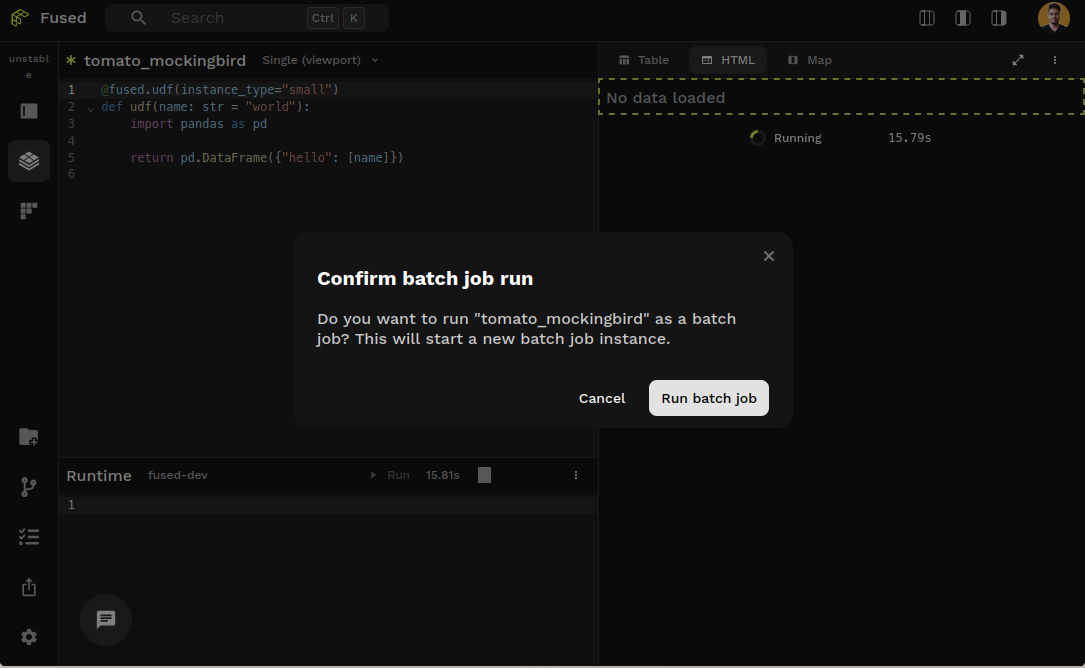
In Workbench, dedicated instance UDFs require manual execution (Shift+Enter) and show a confirmation modal.
Dedicated instance and realtime jobs have separate caches. Running the same UDF with different engine values will cache results independently.
Write to disk, don't return data
Dedicated instance jobs should write results to cloud storage or mount, not return them. Data returned can be lost if the connection times out.
@fused.udf(engine='small')
def my_udf(input_path: str):
    import pandas as pd

    # Process data
    df = pd.read_parquet(input_path)
    result = heavy_processing(df)

    # Write to S3, not return
    output_path = f"s3://my-bucket/results/{...}"
    result.to_parquet(output_path)

    return output_path  # Return the path, not the data
Monitor your jobs
Dedicated instance jobs take time to start and run. Use the Jobs page in Workbench to monitor:
- Status: Running, Completed, Failed
- CPU & Memory: Resource usage over time
- Disk: Storage consumption
- Runtime: How long the job has been running
- Logs: Real-time output from your UDF
# doctest: skip
# Programmatic monitoring
job.status          # Check status
job.tail_logs()     # Stream logs
job.cancel()        # Stop a job
Expect startup delay
Dedicated instances take ~30s to spin up. Plan accordingly—they aren't for quick iterations.
Test your UDF on a small data sample using realtime execution. Once you're confident it works, switch to a batch engine to scale up.
Instance types
| Alias | vCPUs | RAM |
|---|---|---|
small | 2 | 2 GB |
medium | 16 | 64 GB |
large | 64 | 512 GB |
See the full list of AWS / GCP instance types
Combining both
If your jobs need more than 120s or ~4GB RAM each, combine parallel execution with dedicated instances:
# doctest: skip
pool = my_udf.map(inputs, engine="large")
pool.wait()
Example use cases
- Climate Dashboard — Processing 20TB of data in minutes
- Dark Vessel Detection — Retrieving 30 days of AIS data
- Satellite Imagery — Processing Maxar's Open Data STAC Catalogs
- Ingesting cropland data for zonal statistics
- Data ingestion for large geospatial files
See also
- Running UDFs — calling UDFs
- Parallel execution —
.map()details JobPoolAPI reference — all JobPool methods- Caching — how caching works