AIS Dark Vessel Detection
This canvas asks one question: which ships in a Sentinel-1 radar image were not broadcasting their position? Pick an area of US coastal water and press Run pipeline. It detects vessels in the radar image, reads the AIS pings sent at that moment, and flags every vessel with no AIS position nearby as a potential "dark vessel".
Try it out
The input widget has three presets. Los Angeles / Long Beach has a busy anchorage where most large ships match AIS, and a handful don't. Galveston Bay is a smaller, cleaner example. Block Island shows the method's main failure mode: offshore wind turbines are bright in radar but don't broadcast AIS. The hosted AIS data covers US waters in September 2024, so keep the date range inside that month.
How it works
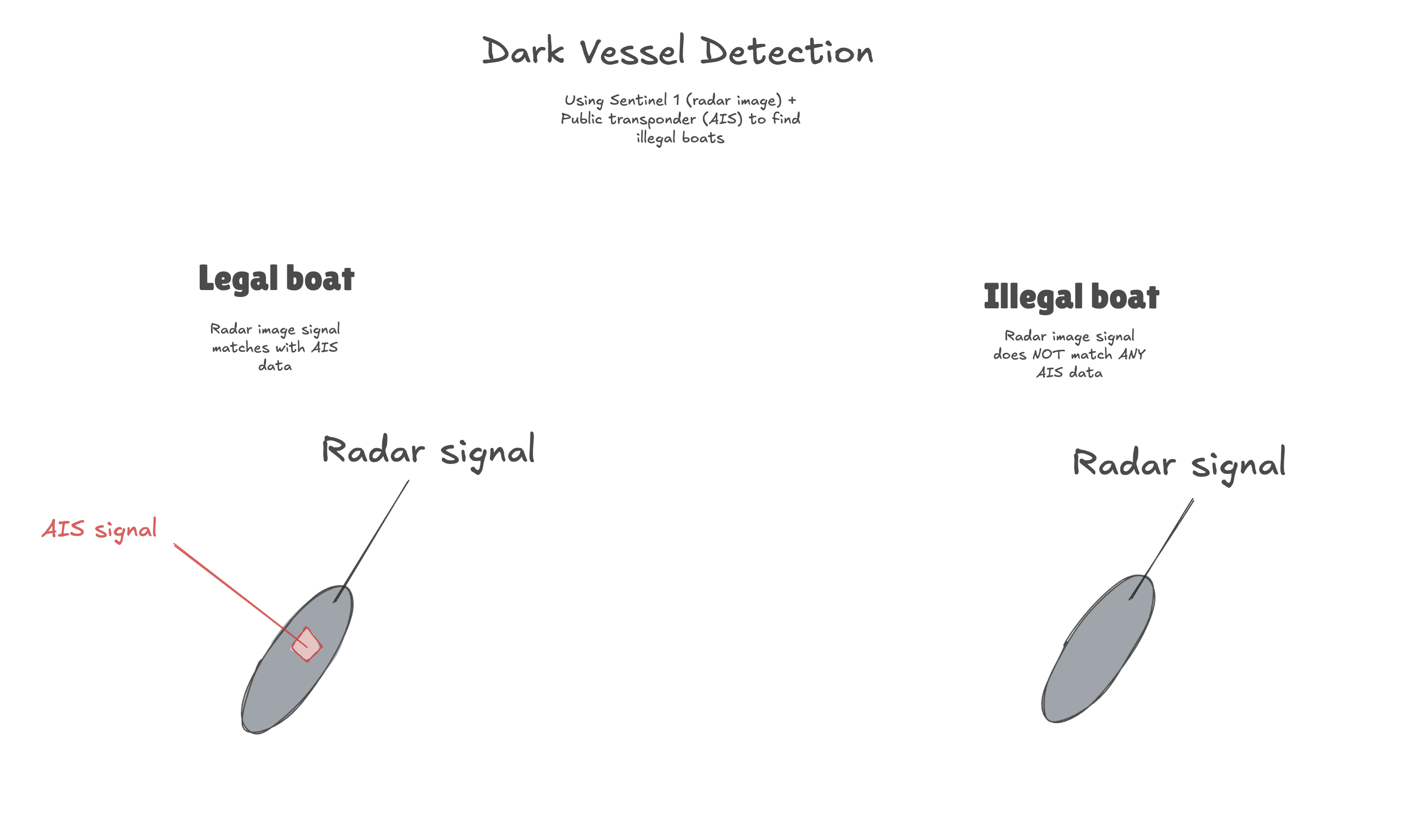
Ships carry transponders that broadcast their position using the Automatic Identification System (AIS), but ships taking part in illegal activity sometimes switch them off. Global Fishing Watch finds these "dark vessels" by comparing radar satellite images, which see every metal hull, with public AIS data. This canvas is a simple version of the same idea:
- Find a Sentinel-1 radar image over the area and detect bright targets on the water.
- Read the AIS pings from a few minutes before and after the image was taken, and place each vessel where it was at that instant.
- Match every radar detection to its nearest AIS vessel. Detections with no AIS vessel nearby are potential dark vessels.
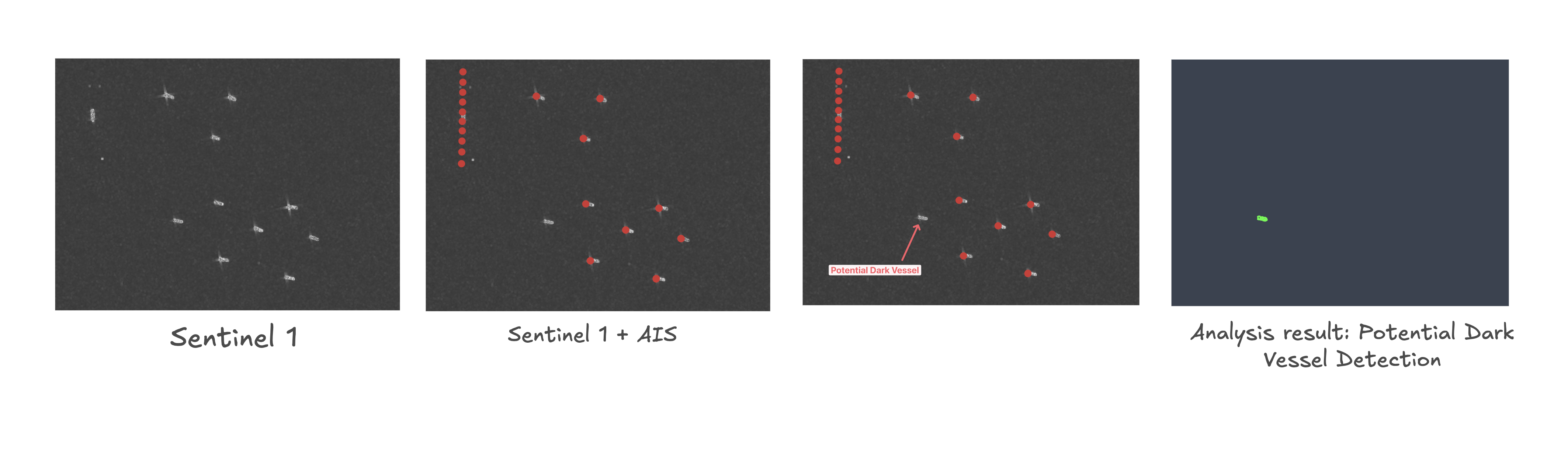
This is a crude analysis, meant to show how the pieces fit together in Fused rather than to expose real dark vessels. Treat red detections as leads to investigate, not proof. See Limitations.
1 · Pick an area and a time window
The input widget shows a satellite map. Choose a preset, or click Draw box and drag a box over coastal water (up to about 40 km across). Set the Sentinel-1 search window and the thresholds, then press Run pipeline. The widget broadcasts bounds, time_of_interest, contrast_db, min_pixels and match_distance_m to the rest of the canvas.
2 · Detect vessels in Sentinel-1
Sentinel-1 vessel detections searches the Microsoft Planetary Computer Sentinel-1 GRD STAC catalog for scenes over your box. It picks the earliest scene that covers the whole box and loads its VV band at 10 m with odc.stac. The data is already a Cloud Optimized GeoTIFF, so only the pixels inside your box are read:
@fused.cache
def load_s1_scene(bounds, time_of_interest, resolution: int = 10):
    import numpy as np
    import odc.stac
    import planetary_computer
    import pystac_client
    import shapely

    catalog = pystac_client.Client.open(
        "https://planetarycomputer.microsoft.com/api/stac/v1",
        modifier=planetary_computer.sign_inplace,
    )
    items = catalog.search(
        collections=["sentinel-1-grd"],
        bbox=list(bounds),
        datetime=time_of_interest,
        query={"sar:instrument_mode": {"eq": "IW"}},
    ).item_collection()
    aoi = shapely.box(*bounds)
    # Prefer scenes that cover the whole AOI, earliest first
    items = sorted(items, key=lambda it: (not shapely.geometry.shape(it.geometry).contains(aoi), it.datetime))
    if not items:
        return None
    item = items[0]

    ds = odc.stac.load([item], crs="EPSG:3857", bands=["vv"], resolution=resolution, bbox=list(bounds))
    vv = ds["vv"].isel(time=0).values.astype("float32")
    vv[vv <= 0] = np.nan  # 0 = outside swath
    return {
        "vv": vv,
        "transform": tuple(ds.odc.geobox.affine)[:6],
        "crs": "EPSG:3857",
        "scene_id": item.id,
        "acquisition_time": item.datetime.replace(tzinfo=None).isoformat(),
    }
@fused.cache stores the result, so changing a threshold later doesn't reload the image.
Calm water reflects radar away from the satellite and looks dark, while metal hulls reflect it back and look bright. So the detector keeps pixels that are more than contrast_db brighter than the mean of the surrounding ~500 m, then groups nearby pixels into one detection per ship:
def detect_vessels(scene, bounds, contrast_db: float = 12.0, min_pixels: int = 10, background_px: int = 51, merge_px: int = 3):
    """Bright-target detection: pixels `contrast_db` brighter than the local sea background."""
    import numpy as np
    from scipy import ndimage

    vv = scene["vv"]
    valid = np.isfinite(vv)
    db = np.where(valid, 20 * np.log10(np.where(valid, vv, 1)), np.nan)

    # Local background = mean dB over a ~500 m window (NaN-aware)
    filled = np.where(valid, db, 0)
    num = ndimage.uniform_filter(filled, background_px)
    den = ndimage.uniform_filter(valid.astype("float32"), background_px)
    background = num / np.maximum(den, 1e-6)

    water = ~land_mask(bounds, tuple(vv.shape), scene["transform"], scene["crs"])
    candidates = valid & water & ((db - background) > contrast_db)

    # Group pixels within ~30 m of each other so one ship's fragments/sidelobes form one detection
    grouped = ndimage.binary_dilation(candidates, iterations=merge_px)
    labels, n = ndimage.label(grouped, structure=np.ones((3, 3)))
    labels = np.where(candidates, labels, 0)
    ...  # drop groups smaller than min_pixels, then vectorise each group into a polygon
Land, piers, breakwaters and artificial islands are just as bright as ships. land_mask removes them using ESA WorldCover at 10 m: every pixel that isn't permanent water (class 80), plus a 50 m margin, is excluded. Each remaining group becomes a polygon with its centroid, approximate length, peak brightness and the scene's exact acquisition time.
3 · Get AIS positions at the moment of the image
AIS from NOAA's AIS Data Handler comes as one zipped CSV per day for the whole US, about 400 MB and 10 million pings each. That's far too slow to open on every run. The canvas instead reads a copy that has been geo-partitioned with fused.ingest: 270 million pings for September 2024, split into ~600 spatial chunks on s3://fused-asset/data/ais/noaa_2024_09/.
AIS positions at image time reads only the chunks that intersect your box, using fused.get_chunks_metadata and fused.get_chunk_from_table. It keeps the pings within ±window_minutes of the acquisition time:
AIS_TABLE = "s3://fused-asset/data/ais/noaa_{yyyy}_{mm}/"  # geo-partitioned NOAA AIS, one table per month

@fused.cache
def read_ais(bounds, t0, window_minutes):
    import pandas as pd
    import shapely

    table = AIS_TABLE.format(yyyy=t0.strftime("%Y"), mm=t0.strftime("%m"))
    if table.startswith("fd://"):
        table = fused.api.resolve(table)  # table readers need the full s3:// path
    chunks = fused.get_chunks_metadata(table)
    chunks = chunks[chunks.intersects(shapely.box(*bounds))]

    lo = (t0 - pd.Timedelta(minutes=window_minutes)).strftime("%Y-%m-%dT%H:%M:%S")
    hi = (t0 + pd.Timedelta(minutes=window_minutes)).strftime("%Y-%m-%dT%H:%M:%S")
    columns = ["MMSI", "BaseDateTime", "LAT", "LON", "SOG", "COG", "VesselName", "VesselType", "Length"]
    minx, miny, maxx, maxy = bounds
    parts = []
    for file_id, chunk_id in zip(chunks.file_id, chunks.chunk_id):
        df = fused.get_chunk_from_table(table, file_id, chunk_id, columns=columns)
        df = df[(df.BaseDateTime >= lo) & (df.BaseDateTime <= hi)]
        df = df[df.LON.between(minx, maxx) & df.LAT.between(miny, maxy)]
        parts.append(pd.DataFrame(df[columns]))
    ...
A ship doing 15 knots moves almost 500 m per minute, so the ping nearest in time isn't good enough. For each vessel (MMSI), the UDF interpolates linearly between the ping just before and the ping just after the acquisition time. If the vessel only reported on one side, it falls back to the nearest ping. For the Los Angeles example this places 171 vessels, with a median gap of about two minutes to the nearest ping.
4 · Match detections to AIS
Match detections to AIS projects both layers to the local UTM zone and uses GeoPandas sjoin_nearest to find each detection's closest AIS vessel. Distance is measured from the detected ship outline, so a 300 m container ship isn't penalised because its AIS antenna sits at one end:
def match(detections, ais, match_distance_m):
    utm = detections.estimate_utm_crs()
    det = detections.to_crs(utm)
    ais_utm = ais[["MMSI", "VesselName", "VesselType", "Length", "geometry"]].to_crs(utm)
    # Distance from the detected ship outline to the nearest AIS position
    out = det.sjoin_nearest(ais_utm, how="left", distance_col="distance_m").drop(columns="index_right")
    out = out.sort_values("distance_m").drop_duplicates("detection_id").sort_values("detection_id")
    out["status"] = "dark"
    out.loc[out["distance_m"] <= match_distance_m, "status"] = "matched"
    return out.to_crs(4326)
Any detection farther than match_distance_m (300 m by default) from every AIS position is flagged dark.
5 · Dark vessel map
The output node draws everything on one map:
- the Sentinel-1 image (toggle SAR image)
- detections outlined in yellow (matched) or red (no AIS match); click one for its size, brightness and nearest AIS vessel
- AIS tracks and interpolated positions in cyan; click a position for the vessel's name, MMSI, length and speed
- a list of unmatched detections, largest first; click a row to zoom to it
For the Los Angeles / Long Beach preset (scene S1A_IW_GRDH_1SDV_20240904T015824, 4 Sept 2024 01:58 UTC) the canvas finds 96 detections. 53 match AIS. Most of the 43 unmatched ones are small craft inside the harbour, but a few 150–220 m targets sit in open water at the anchorage with no AIS within ±10 minutes.
Bring your own AIS month
The hosted table only covers September 2024. To analyse another month, build your own table in two steps.
1. Download each day to parquet. The canvas's NOAA AIS day to parquet UDF (in the Data prep folder) downloads one day from NOAA and writes it to fd://, your account's S3 bucket:
@fused.udf
def noaa_ais_to_parquet(datestr: str = "2024_09_04", output_dir: str = "fd://AIS/daily/", overwrite: bool = False):
    import io
    import zipfile

    import fsspec
    import pandas as pd
    import requests

    url = f"https://coast.noaa.gov/htdata/CMSP/AISDataHandler/{datestr[:4]}/AIS_{datestr}.zip"
    daily_parquet = f"{output_dir.rstrip('/')}/{datestr[:7]}/{datestr[-2:]}.parquet"

    fs, _ = fsspec.core.url_to_fs(daily_parquet)
    if fs.exists(daily_parquet) and not overwrite:
        return pd.DataFrame({"status": ["exists"], "file_path": [daily_parquet]})

    r = requests.get(url, timeout=300)
    if r.status_code != 200:
        return pd.DataFrame({"status": [f"read_error_{r.status_code}"], "file_path": [None]})

    with zipfile.ZipFile(io.BytesIO(r.content)) as z:
        with z.open(f"AIS_{datestr}.csv") as f:
            # MMSI is the vessel identifier - keep it (and other IDs) as strings
            df = pd.read_csv(f, dtype={"MMSI": str, "IMO": str, "CallSign": str, "VesselName": str})
    df.to_parquet(daily_parquet)
    return pd.DataFrame({"status": ["done"], "file_path": [daily_parquet], "rows": [len(df)]})
Each day takes about a minute. From a notebook, use fused.submit to run a whole month in parallel. Pass debug_mode=True first to run only the first date:
# doctest: skip
import pandas as pd

dates = pd.DataFrame({"datestr": pd.date_range("2024-08-01", "2024-08-31").strftime("%Y_%m_%d")})

fused.submit(noaa_ais_to_parquet, dates, debug_mode=True)  # runs only the first date
results = fused.submit(noaa_ais_to_parquet, dates)         # all 31 days in parallel
fd:// or s3://, not fused.file_path()Older versions of this example saved the daily files with fused.file_path(). That path is temporary storage on the realtime workers (kept for 12 hours), and the batch machine that runs fused.ingest can't see it, so the ingest job fails with FileNotFoundError. Write to fd:// or your own s3:// bucket instead.
2. Geo-partition the month. fused.ingest turns the daily files into one table split into spatial chunks, building point geometries from the LON/LAT columns. A month is ~8 GB of parquet, so run it on a large batch instance:
# doctest: skip
job = fused.ingest(
    [f"fd://AIS/daily/2024_08/{d:02d}.parquet" for d in range(1, 32)],
    "fd://AIS/noaa_2024_08/",
    target_num_chunks=500,
    lonlat_cols=("LON", "LAT"),
)
job.run_batch(instance_type="r5.8xlarge", disk_size_gb=999)
run_batch returns a job you can follow in Workbench → Jobs. When it finishes, point AIS_TABLE in AIS positions at image time at your table (for example "fd://AIS/noaa_{yyyy}_{mm}/"). The UDF resolves fd:// to the full s3:// path with fused.api.resolve(), because the table readers need a real S3 URI. The rest of the pipeline works unchanged.
About the data
| Property | Value |
|---|---|
| Radar imagery | Sentinel-1 GRD (IW, VV), ESA Copernicus via Microsoft Planetary Computer, 10 m |
| Land / water mask | ESA WorldCover 10 m, class 80 = permanent water |
| Vessel positions | NOAA / BOEM AIS via NOAA Digital Coast, US waters |
| Hosted AIS table | s3://fused-asset/data/ais/noaa_2024_09/: September 2024, 270M pings, geo-partitioned with fused.ingest |
| Basemap | Esri World Imagery |
Limitations & next steps
This analysis makes naive assumptions. The biggest is that every bright spot on the water is a ship. Some things that also show up as "dark":
- Fixed structures. Wind turbines, oil platforms and navigation aids are bright and don't broadcast AIS. The WorldCover mask removes most harbour infrastructure, but not structures offshore. Try the Block Island preset: the turbines of the Block Island Wind Farm are all flagged.
- Small boats. Recreational boats and small fishing vessels aren't required to carry AIS. Raise
min_pixelsto focus on larger vessels. - Radar artefacts. Very bright ships produce cross-shaped sidelobes. The detector merges fragments within ~30 m, but strong sidelobes can still form separate detections.
- Timing. AIS positions are interpolated between pings. A vessel that stopped reporting shortly before the image may be misplaced. Widen
window_minutesor raisematch_distance_mto be more forgiving.
Ways to take this further:
- Use a proper CFAR detector, or a trained model, instead of a fixed dB threshold.
- Mask known offshore infrastructure, for example turbines and platforms from OpenStreetMap.
- Follow AIS tracks over hours or days to see when a vessel went dark, not just whether it was dark at one instant.
- Run the pipeline over every Sentinel-1 pass along the US coast with
fused.submitto build a dark-vessel time series.
See also
- Canvas Gallery: more end-to-end canvases, including an AIS traffic exploration canvas.
- Geospatial ingestion: how
fused.ingestpartitions large vector datasets. - Caching: how
@fused.cachekeeps the image and AIS reads fast when you tweak thresholds.