Will You Be Late to Your Meetings?
This example shows how to connect Google Calendar to a Fused pipeline that calculates travel time between appointments and flags meetings you're likely to be late for — then exposes the result to AI agents like Claude.
Walkthrough: Checking whether you'll make your meetings on time using Fused and Claude. Try the Canvas →
Knowing your next meeting starts in 30 minutes doesn't help if the commute takes 45. Calendar apps show times but ignore the real world — where you are, how long it takes to get between locations, and whether the gap between back-to-back meetings is actually enough. With Fused, you can pull your Google Calendar events, compute routing and travel times, and surface schedule conflicts to an AI agent.
Building the canvas
1. Pull events from Google Calendar
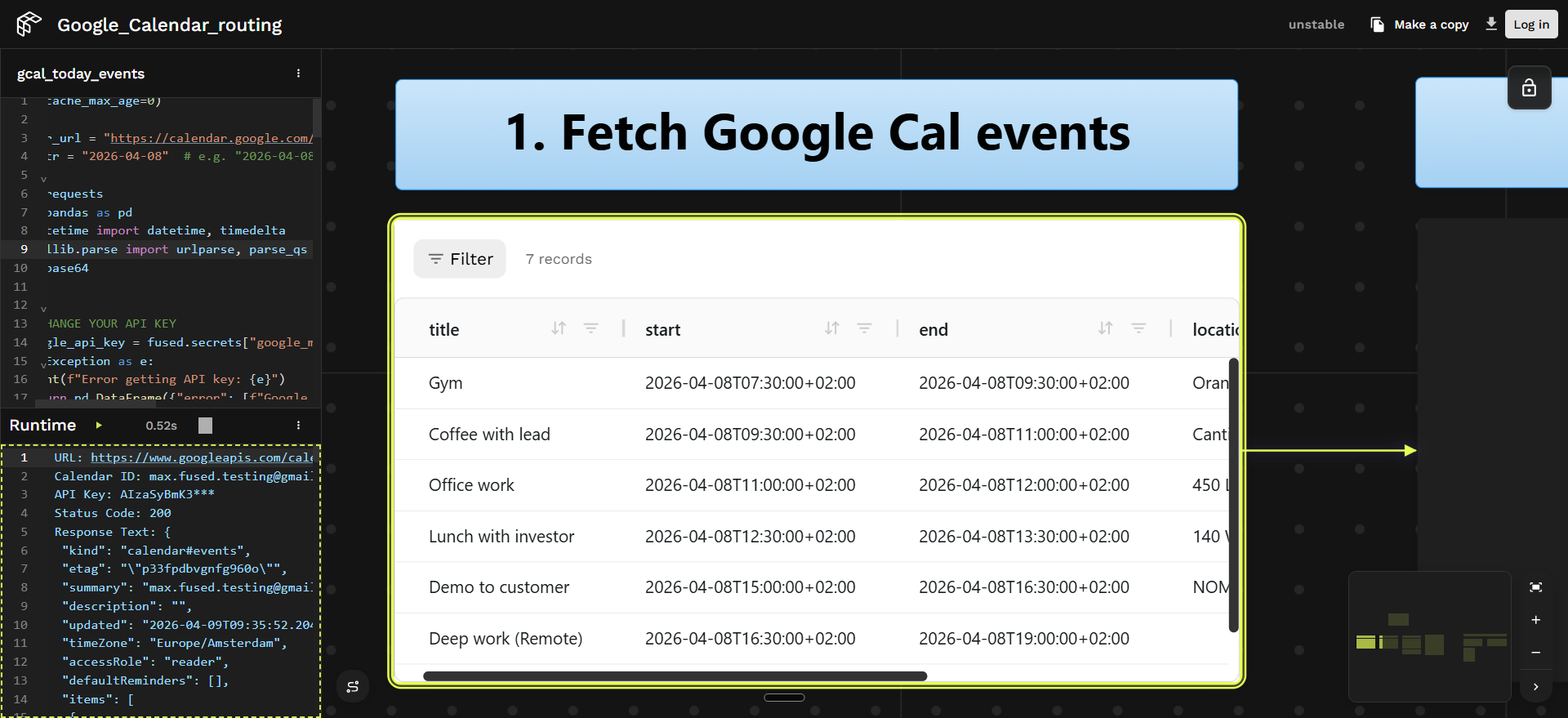
The gcal_today_events UDF connects to the Google Calendar API and loads the day's events — meetings, blocks, and appointments — into a DataFrame with titles, start/end times, and locations.
Setting cache_max_age=0 disables caching so the UDF always pulls the latest calendar data on every run — ensuring real-time updates when you reschedule meetings.
Show UDF code
@fused.udf(cache_max_age=0)
def udf(
    calendar_url="https://calendar.google.com/calendar/u/3?cid=bWF4LmZ1c2VkLnRlc3RpbmdAZ21haWwuY29t",  # replace with your calendar URL
    date: str = "2026-04-08",  # replace with your date or leave empty for today
):
    import requests
    import pandas as pd
    from datetime import datetime
    from urllib.parse import urlparse, parse_qs
    import base64

    google_api_key = fused.secrets["google_maps_api"]  # set in Fused Secrets

    parsed_url = urlparse(calendar_url)
    cid_param = parse_qs(parsed_url.query).get("cid", [None])[0]
    if not cid_param:
        return pd.DataFrame({"error": ["No calendar ID found in URL"]})

    calendar_id = base64.b64decode(cid_param).decode("utf-8")

    if date:
        today = datetime.strptime(date, "%Y-%m-%d").date()
    else:
        today = datetime.utcnow().date()
    time_min = datetime.combine(today, datetime.min.time()).isoformat() + "Z"
    time_max = datetime.combine(today, datetime.max.time()).isoformat() + "Z"

    url = f"https://www.googleapis.com/calendar/v3/calendars/{calendar_id}/events"
    params = {
        "key": google_api_key,
        "timeMin": time_min,
        "timeMax": time_max,
        "singleEvents": True,
        "orderBy": "startTime",
    }

    response = requests.get(url, params=params)
    data = response.json()
    events = data.get("items", [])
    if not events:
        return pd.DataFrame({"message": [f"No events scheduled for {today}"]})

    event_list = []
    for event in events:
        event_list.append({
            "title": event.get("summary", "No title"),
            "start": event.get("start", {}).get("dateTime", event.get("start", {}).get("date")),
            "end": event.get("end", {}).get("dateTime", event.get("end", {}).get("date")),
            "description": event.get("description", ""),
            "location": event.get("location", ""),
        })

    return pd.DataFrame(event_list)
2. Geocode locations and compute routes
Two downstream UDFs handle geocoding and routing.
Geocoding — The gcal_events_geocode UDF uses fused.load() to call gcal_today_events, then geocodes each event's location using the Nominatim API. The @fused.cache decorator on the geocoding function means locations are cached — if you move a meeting's time but not its location, the next run skips the geocoding call and only re-fetches the calendar data.
This UDF also uses cache_max_age=0 so that updated calendar events flow through immediately.
Show geocoding UDF code
@fused.udf(cache_max_age=0)
def udf(date: str = "2026-04-08"):
    import pandas as pd
    from geopy.geocoders import Nominatim
    import time

    gcal = fused.load("gcal_today_events")
    data = gcal(date=date)

    @fused.cache
    def geocode_location(location):
        if not location or not str(location).strip():
            return None, None
        geocoder = Nominatim(user_agent="fused_geocoder")
        result = geocoder.geocode(str(location), timeout=10)
        time.sleep(0.2)
        if result:
            return result.latitude, result.longitude
        return None, None

    lats, lons = [], []
    for location in data["location"].fillna(""):
        lat, lon = geocode_location(location)
        lats.append(lat)
        lons.append(lon)

    data["latitude"] = lats
    data["longitude"] = lons
    return data
Routing — The nyc_meeting_routes UDF loads the geocoded events, then calls the Google Routes API to get driving time between each consecutive pair of meetings. It compares the travel time against the gap between meetings and marks each transition as On Time or Will Be Late.
Routes are cached with @fused.cache — the same origin/destination pair won't trigger another API call on subsequent runs.
Show routing UDF code
@fused.udf
def udf(date: str = "2026-04-08"):
    """
    Computes driving routes between consecutive meetings on a given day.

    Returns a GeoDataFrame with one row per consecutive meeting pair, including
    route geometry, distance, duration, and on-time status.
    """
    import requests
    import pandas as pd
    import geopandas as gpd
    from shapely.geometry import LineString
    from datetime import datetime

    geocode = fused.load("gcal_events_geocode")
    meetings_df = geocode(date=date)

    meetings_df = meetings_df[
        (meetings_df["latitude"].notna()) & (meetings_df["longitude"].notna())
    ].reset_index(drop=True)

    google_maps_api = fused.secrets["google_maps_api"]  # set in Fused Secrets

    def format_time_range(start_str, end_str):
        start_time = datetime.fromisoformat(start_str.replace("Z", "+00:00")).strftime("%H:%M")
        end_time = datetime.fromisoformat(end_str.replace("Z", "+00:00")).strftime("%H:%M")
        return f"{start_time} - {end_time}"

    @fused.cache()
    def get_route(origin_lat, origin_lon, dest_lat, dest_lon):
        url = "https://routes.googleapis.com/directions/v2:computeRoutes"
        headers = {
            "Content-Type": "application/json",
            "X-Goog-Api-Key": google_maps_api,
            "X-Goog-FieldMask": "routes.duration,routes.distanceMeters,routes.polyline.encodedPolyline",
        }
        payload = {
            "origin": {"location": {"latLng": {"latitude": origin_lat, "longitude": origin_lon}}},
            "destination": {"location": {"latLng": {"latitude": dest_lat, "longitude": dest_lon}}},
            "travelMode": "DRIVE",
            "routingPreference": "TRAFFIC_AWARE",
        }
        response = requests.post(url, headers=headers, json=payload)
        data = response.json()
        if "routes" in data and len(data["routes"]) > 0:
            return data["routes"][0]
        return None

    def decode_polyline(encoded, origin_lon, origin_lat, dest_lon, dest_lat):
        import polyline
        coords = polyline.decode(encoded)
        return [(lon, lat) for lat, lon in coords]

    routes_data = []
    for i in range(len(meetings_df) - 1):
        origin = meetings_df.iloc[i]
        destination = meetings_df.iloc[i + 1]

        route = get_route(
            origin["latitude"], origin["longitude"],
            destination["latitude"], destination["longitude"],
        )
        if route:
            if "polyline" in route and "encodedPolyline" in route["polyline"]:
                geometry_coords = decode_polyline(
                    route["polyline"]["encodedPolyline"],
                    origin["longitude"], origin["latitude"],
                    destination["longitude"], destination["latitude"],
                )
            else:
                geometry_coords = [
                    (origin["longitude"], origin["latitude"]),
                    (destination["longitude"], destination["latitude"]),
                ]

            routes_data.append({
                "from_meeting": origin["title"],
                "to_meeting": destination["title"],
                "from_time": format_time_range(origin["start"], origin["end"]),
                "from_location": origin["location"],
                "to_time": format_time_range(destination["start"], destination["end"]),
                "to_location": destination["location"],
                "distance_meters": route.get("distanceMeters"),
                "duration": route.get("duration"),
                "from_lat": origin["latitude"],
                "from_lon": origin["longitude"],
                "to_lat": destination["latitude"],
                "to_lon": destination["longitude"],
                "geometry": LineString(geometry_coords),
            })

    routes_gdf = gpd.GeoDataFrame(routes_data, geometry="geometry", crs="EPSG:4326")

    def parse_end_minutes(time_range):
        end = time_range.split(" - ")[1].strip()
        h, m = map(int, end.split(":"))
        return h * 60 + m

    def parse_start_minutes(time_range):
        start = time_range.split(" - ")[0].strip()
        h, m = map(int, start.split(":"))
        return h * 60 + m

    def parse_duration_seconds(duration_str):
        return int(str(duration_str).replace("s", "").strip())

    routes_gdf["gap_minutes"] = (
        routes_gdf["to_time"].apply(parse_start_minutes)
        - routes_gdf["from_time"].apply(parse_end_minutes)
    )
    routes_gdf["travel_minutes"] = routes_gdf["duration"].apply(
        lambda d: round(parse_duration_seconds(d) / 60)
    )
    routes_gdf["buffer_minutes"] = routes_gdf["gap_minutes"] - routes_gdf["travel_minutes"]
    routes_gdf["status"] = routes_gdf["buffer_minutes"].apply(
        lambda b: "On Time" if b is not None and b >= 0 else "Will Be Late"
    )

    return routes_gdf
3. Expose to an AI agent
Only the final nyc_meeting_routes UDF is made visible on the Canvas — the upstream gcal_today_events and gcal_events_geocode UDFs are hidden. This means the agent only sees the schedule analysis tool, not the intermediate geocoding or calendar-fetching steps. The agent gets a clean interface: it can query meeting routes and lateness status without needing to understand the pipeline internals.
Return only a small amount of data from the exposed UDF so the agent's context isn't overloaded.
The Canvas publishes the visible UDF as an agent-callable endpoint via its OpenAPI specification. See Expose your Canvas to agents for how visible vs. hidden UDFs map to the OpenAPI tool list.

4. Connect an AI agent
Once the Canvas is shared and its OpenAPI spec is available, you can connect an AI agent to it. Here's how to set up Claude Code:
- Teach Claude Code about Fused. Paste the Fused skills into Claude Code so it understands how to interact with Fused endpoints. Tell it: "always use these skills when working with Fused."
- Give it the OpenAPI spec. In the Canvas, click Share → OpenAPI and copy the
.api.jsonURL (it looks likehttps://udf.ai/fc_<your_token>.api.json). Paste it into Claude Code so the agent knows which tools are available and what parameters they accept. - Ask questions. The agent can now query the schedule analysis directly:
- "Will I make all my meetings on time today?"
- "Which meeting am I most likely to be late to?"
- "How much buffer do I have between my 2pm and 3pm?"

5. Adjust and re-check
After editing your calendar in Google Calendar — moving a meeting, adding buffer time — re-run the pipeline to verify the updated schedule works. Because cache_max_age=0 is set on the calendar and geocoding UDFs, the pipeline always pulls the latest events from Google Calendar.
Build it yourself
To run this with your own calendar you need:
Google Maps API — for geocoding and routing:
- Get an API key from the Google Cloud Console
- Enable the Routes API and Calendar API
In Fused Workbench, go to Preferences → Environment → Secrets management (docs) and add your API key with the name google_maps_api. The pipeline references it as fused.secrets["google_maps_api"].
Google Calendar — must be publicly accessible:
- Open Google Calendar → click ⋮ next to your calendar → Settings and sharing
- Under Access permissions, check Make available to public
- Copy the Calendar ID (under Integrate calendar) and paste it into the
calendar_urlparameter of thegcal_today_eventsUDF in the Canvas
Try it out
Open the Fused Canvas to explore the live pipeline. It connects to Google Calendar, calculates travel time between your events, and flags conflicts — ready for you to query with an AI agent.
First, make a copy of the Canvas. Then follow the Share Modal guide to publish it. Once shared, click Share → OpenAPI to get the OpenAPI specification you can hand to any AI agent.