Run ComfyUI workflows in Fused
Using Fused to cache, orchestrate & reuse pipelines on top of ComfyUI to make easily repeatable image generation workflows.
ComfyUI is a powerful node-based tool for diffusion model pipelines — but sharing, scheduling, and caching those runs requires orchestration outside ComfyUI. Fused acts as that layer: it calls ComfyUI (via Comfy Cloud or a self-hosted GPU), caches results so identical runs are instant, stores outputs to S3, and makes everything shareable as a live link.
Add your key once as a Fused secret named COMFY_API_KEY:
- Go to Workbench → Integrations & secrets → Personal/Team secrets
- Click Add new secret, name it
COMFY_API_KEY, paste your key - All UDFs on the canvas read it automatically — no code changes needed
Adapt this to your own workflow
The pattern is the same for any ComfyUI workflow:
-
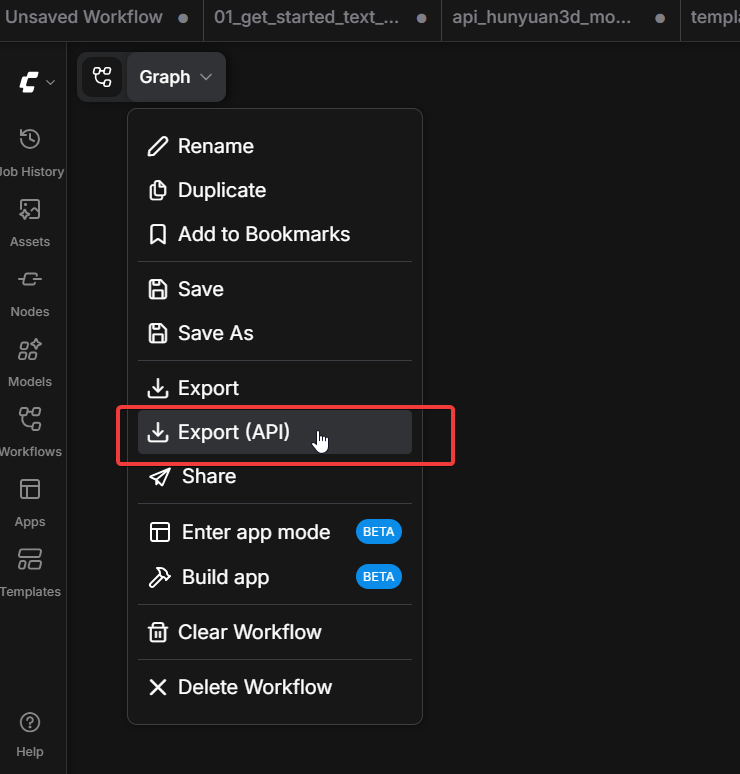
Export the API JSON from ComfyUI (Graph → Export (API)). You can start from an existing shared workflow — for example, the Images to Video graph or the Text to Image graph on Comfy Cloud. Open it in ComfyUI, then export via Graph → Export (API).
-
Upload the JSON to S3 (or any URL Fused can reach via
sign_url). -
Update the input and output nodes to match your workflow. Node IDs are the top-level keys in the exported JSON.
-
Write a
@fused.cachehelper that loads the workflow, patches those nodes, submits, polls, and uploads the result. -
Write a thin
@fused.udfwrapper that calls the helper and returns a signed URL or array. Useengine='small'if the job runs longer than 120 seconds — see batch jobs. -
Add a widget (JSON) to expose parameters as form controls on the canvas.
The two pipelines below — Images to Video and Text to Image — are concrete examples of this pattern, both living on the same canvas.
Deep dive: Images to Video
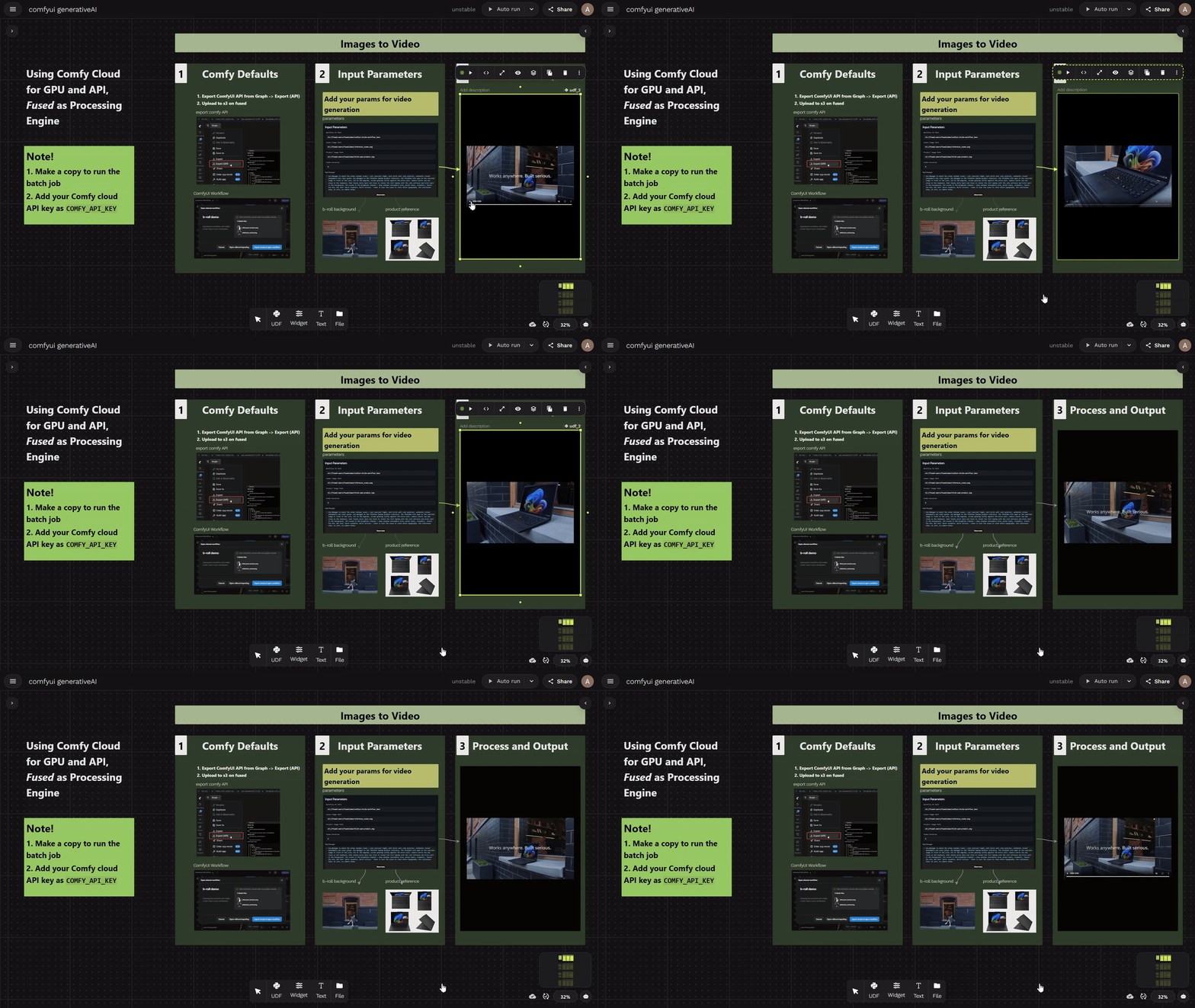
The goal is to generate b-roll footage: given a scene image (the background environment) and a product image, the SeedDance 2 Fast model running on Comfy Cloud produces a cinematic product video. Fused acts as the processing engine — it loads the workflow JSON, uploads the inputs, triggers the Comfy Cloud API, polls for completion, saves the output to S3, and returns a signed URL, all from a single UDF. The result is cached, the API key stays secret, and the output is instantly shareable.
The Fused UDF
The UDF is split into two parts: a @fused.cache helper that runs the expensive GPU job, and a thin @fused.udf wrapper that refreshes the signed URL. The wrapper uses engine='small', which runs it as a batch job — necessary because video generation can take several minutes, well beyond the 120-second limit of realtime UDFs.
View full UDF code
import fused
import mimetypes
from urllib.parse import urlsplit

@fused.cache
def run_comfy_job(
    workflow_s3_path, scene_image_path, product_image_path,
    text_prompt, vid_duration, seed, s3_base
):
    import time, requests
    from pathlib import Path

    BASE_URL = "https://cloud.comfy.org"
    headers = {"X-API-Key": fused.secrets["COMFY_API_KEY"]}

    workflow = requests.get(fused.api.sign_url(workflow_s3_path)).json()

    def _upload_to_comfy(image_path: str) -> str:
        if image_path.startswith("s3://"):
            img_bytes = requests.get(fused.api.sign_url(image_path)).content
            fname = image_path.split("/")[-1]
        else:
            fname = Path(image_path).name
            img_bytes = Path(image_path).read_bytes()
        resp = requests.post(
            f"{BASE_URL}/api/upload/image",
            headers=headers,
            files={"image": (fname, img_bytes, "image/png")},
        )
        resp.raise_for_status()
        return resp.json()["name"]

    workflow["3"]["inputs"]["image"] = _upload_to_comfy(scene_image_path)
    workflow["2"]["inputs"]["image"] = _upload_to_comfy(product_image_path)
    workflow["1"]["inputs"]["model.prompt"] = text_prompt
    workflow["1"]["inputs"]["model.duration"] = int(vid_duration)
    workflow["1"]["inputs"]["seed"] = seed

    api_key = fused.secrets["COMFY_API_KEY"]
    prompt_id = requests.post(
        f"{BASE_URL}/api/prompt",
        headers={**headers, "Content-Type": "application/json"},
        json={"prompt": workflow, "extra_data": {"api_key_comfy_org": api_key}},
    ).json()["prompt_id"]

    history = {}
    for _ in range(120):
        job = requests.get(f"{BASE_URL}/api/job/{prompt_id}/status", headers=headers).json()
        if job.get("status") in ("failed", "cancelled", "error"):
            raise RuntimeError(f"Comfy job failed: {job.get('error_message')}")
        if job.get("status") in ("success", "completed"):
            resp = requests.get(f"{BASE_URL}/api/history_v2/{prompt_id}", headers=headers)
            if resp.status_code == 200 and resp.text.strip():
                history = resp.json().get(prompt_id, {})
            break
        time.sleep(5)

    first_video_s3_path = None
    for node_outputs in history.get("outputs", {}).values():
        for media_key in ("images", "video", "audio"):
            for file_info in node_outputs.get(media_key, []):
                data = requests.get(
                    f"{BASE_URL}/api/view",
                    headers=headers,
                    params={"filename": file_info["filename"], "type": file_info.get("type", "output")},
                ).content
                local_tmp = f"/tmp/{file_info['filename']}"
                with open(local_tmp, "wb") as f:
                    f.write(data)
                s3_path = s3_base + file_info["filename"]
                fused.api.upload(local_tmp, s3_path)
                first_video_s3_path = s3_path

    return first_video_s3_path


@fused.udf(engine='small')
def images_to_video(
    workflow_s3_path: str = "s3://fused-users/fused/aman/comfyui-brole-workflow.json",
    scene_image_path: str = "s3://fused-users/fused/aman/reference_scene.png",
    product_image_path: str = "s3://fused-users/fused/aman/think-pad-product.png",
    text_prompt: str = "Use @image1 to match the scene...",
    vid_duration: str = "5",
    seed: int = 387457956,
    s3_base: str = "s3://fused-users/fused/aman/comfyui-text-to-image/",
):
    video_s3_path = run_comfy_job(
        workflow_s3_path, scene_image_path, product_image_path,
        text_prompt, vid_duration, seed, s3_base
    )
    signed_url = fused.api.sign_url(video_s3_path)
    source_type = mimetypes.guess_type(urlsplit(signed_url).path)[0] or "video/mp4"

    return f"""
    <html>
    <body style="margin:0;display:flex;justify-content:center;align-items:center;height:100vh;background:#000;">
        <video controls autoplay muted style="max-width:100%;max-height:100%;">
            <source src="{signed_url}" type="{source_type}">
        </video>
    </body>
    </html>
    """
The IDs "1", "2", "3" above come from this particular workflow's exported JSON. Open your own exported API JSON and look up the top-level keys for the nodes you want to control — they will be different.
Other pipelines on the canvas
Text to Image
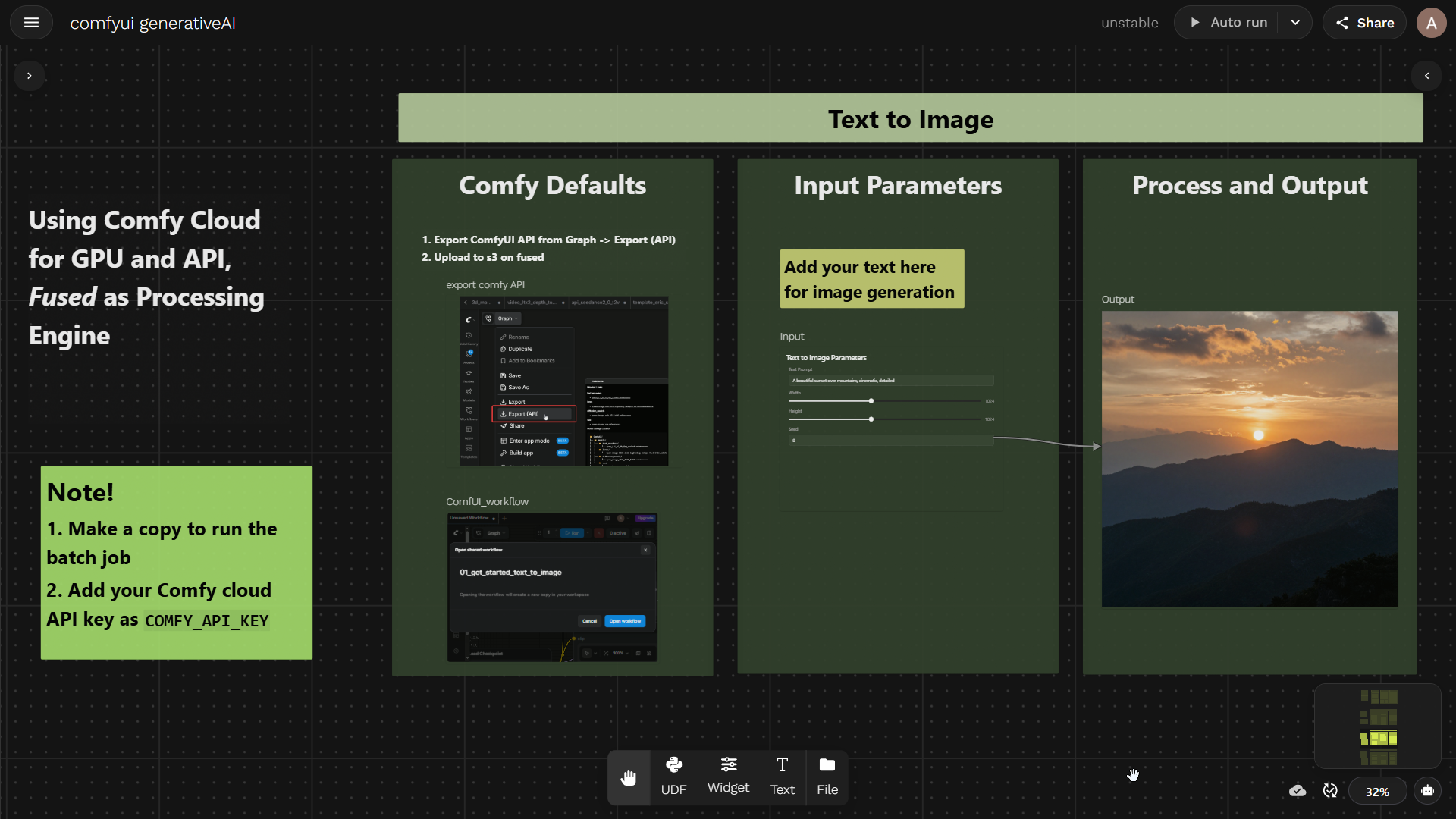
Type a prompt, get a PNG. The UDF loads a z-image-turbo workflow from S3, patches the prompt and seed nodes, submits to Comfy Cloud, and returns the image as a NumPy array. The workflow is shared on Comfy Cloud.
View full UDF code
import fused

@fused.udf(cache_max_age="0s")
def text_to_image(
    text_prompt: str = "A beautiful sunset over mountains",
    workflow_s3_path: str = "s3://fused-users/fused/aman/01_get_started_text_to_image.json",
    seed: int = 0,
    output_dir: str = "./outputs",
):
    import io, os, time
    import numpy as np
    import requests
    from PIL import Image

    BASE_URL = "https://cloud.comfy.org"
    headers = {"X-API-Key": fused.secrets["COMFY_API_KEY"]}

    workflow = requests.get(fused.api.sign_url(workflow_s3_path)).json()
    workflow["104:90"]["inputs"]["text"] = text_prompt
    workflow["104:92"]["inputs"]["seed"] = seed

    prompt_id = requests.post(
        f"{BASE_URL}/api/prompt",
        headers={**headers, "Content-Type": "application/json"},
        json={"prompt": workflow},
    ).json()["prompt_id"]

    history = {}
    for _ in range(30):
        resp = requests.get(f"{BASE_URL}/api/history_v2/{prompt_id}", headers=headers)
        if resp.status_code == 200 and resp.text.strip():
            history = resp.json().get(prompt_id, {})
            if history.get("status", {}).get("completed"):
                break
        time.sleep(2)

    outputs = history.get("outputs", {})

    def _download(filename, output_type="output"):
        return requests.get(
            f"{BASE_URL}/api/view",
            headers=headers,
            params={"filename": filename, "type": output_type},
        ).content

    os.makedirs(output_dir, exist_ok=True)
    first_image = None
    s3_base = "s3://fused-users/fused/aman/comfyui-text-to-image/"

    for node_outputs in outputs.values():
        for media_key in ("images", "video", "audio"):
            for file_info in node_outputs.get(media_key, []):
                data = _download(file_info["filename"], file_info.get("type", "output"))
                local_path = os.path.join(output_dir, file_info["filename"])
                with open(local_path, "wb") as f:
                    f.write(data)
                s3_path = s3_base + file_info["filename"]
                fused.api.upload(local_path, s3_path)
                if media_key == "images" and first_image is None:
                    first_image = data

    arr = np.array(Image.open(io.BytesIO(first_image)).convert("RGB"))
    return np.moveaxis(arr, -1, 0)
The IDs "104:90" and "104:92" above are specific to this z-image-turbo workflow. Check the top-level keys in your own exported API JSON to find the correct IDs for your text prompt and seed nodes.
Why run this on Fused?
@fused.cache— identical inputs return instantly; no GPU charges for repeat runs.fused.secrets— your Comfy Cloud API key lives in Fused secrets, never in code.fused.api.sign_url— reference images and workflow JSONs on S3 without making them public.- S3 output storage — results are saved directly to S3 and accessible via signed URL; no manual download steps.
- Version controlled — UDFs are plain Python files you can track in git alongside your workflow JSONs.
- Canvas — organize multiple pipelines in one view and share the whole thing with one link.
- Widgets — expose parameters as sliders, inputs, and dropdowns without touching Python.
- Embed links — any UDF output is a live HTTPS endpoint you can embed in docs, dashboards, or Notion.
See also
@fused.cache— result caching reference- Secrets management — storing API keys
- Widgets — building canvas controls
- Sharing canvas dashboards — sharing your work
- Branded text to image — another generative AI pipeline on Fused