Seismic Hazard Mapping
Cross-reference earthquake hazard with building density over Italy to find where the most buildings sit in the highest-risk zones.
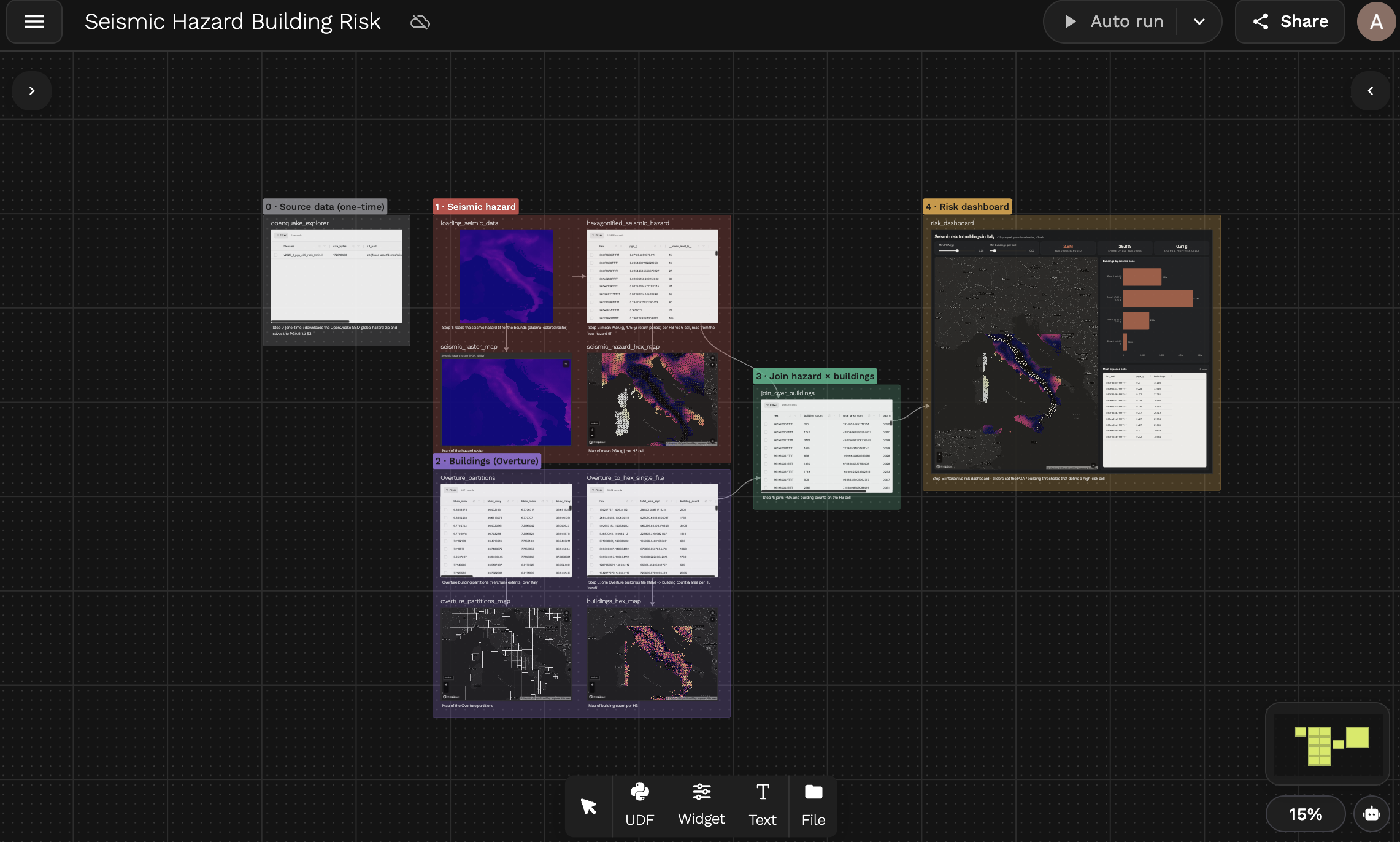
Open the live canvas: Seismic Hazard Building Risk
The problem
Italy sits at the collision of the African and Eurasian tectonic plates. Cities like L'Aquila and Amatrice have suffered devastating earthquakes in living memory. The goal: find where the highest concentration of buildings overlaps with the highest seismic hazard.
That requires joining two datasets that have nothing in common structurally — a raster and a vector — from two different organizations. H3 makes it trivial.
Data sources
- Seismic hazard — GEM Foundation OpenQuake Global Seismic Hazard Map (GSHM 2023). Each pixel is a Peak Ground Acceleration (PGA) value, in units of g, with a 475-year return period (10% chance of being exceeded in 50 years) on rock.
- Buildings — Overture Maps building footprints for Italy, as pre-partitioned GeoParquet files.
Canvas overview
The canvas is organized into five folders: one-time source data, the hazard pipeline, the buildings pipeline, the join, and the dashboard.
| Step | UDF | What it does |
|---|---|---|
| 0 | openquake_explorer | Downloads the OpenQuake GeoTIFF and saves it to S3 once |
| 1 | loading_seimic_data | Reads the TIF for a bounding box as a colored raster, for the map |
| 2 | hexagonified_seismic_hazard | Reads the raw PGA values and averages them per H3 cell |
| 3 | Overture_partitions | Shows Overture partition footprints across Italy |
| 3 | Overture_to_hex_single_file | Counts buildings and sums footprint area per H3 cell with DuckDB |
| 4 | join_over_buildings | Inner-joins both hex tables on H3 cell ID |
| 5 | risk_dashboard | Widget with threshold sliders, KPI tiles, map, charts and a table |
The canvas also has small map widgets (seismic_raster_map, seismic_hazard_hex_map, overture_partitions_map, buildings_hex_map) that visualize the output of each step.
1. Ingest the seismic GeoTIFF
The OpenQuake dataset is distributed as a ZIP containing a GeoTIFF. Rather than downloading it on every run, this UDF fetches it once and writes it to S3. Subsequent UDFs read from S3 directly.
View openquake_explorer code
@fused.udf
def udf(save_to_s3: bool = True):
    import pandas as pd
    import requests
    import io
    import zipfile

    url = "https://cloud.openquake.org/public.php/dav/files/6SnFk2f92JEr76H"

    @fused.cache  # <-- fetch once, re-use on subsequent runs
    def fetch_zip(url):
        response = requests.get(url, timeout=60)
        response.raise_for_status()
        return response.content

    content = fetch_zip(url)
    zf = zipfile.ZipFile(io.BytesIO(content))

    tif_name = "v2023_1_pga_475_rock_3min.tif"
    s3_path = f"s3://fused-asset/demos/seismic_data/{tif_name}"

    print(f"Extracting {tif_name} from ZIP...")
    tif_bytes = zf.read(tif_name)
    print(f"Extracted {len(tif_bytes):,} bytes")

    if save_to_s3:
        import s3fs
        fs = s3fs.S3FileSystem()
        with fs.open(s3_path, "wb") as f:
            f.write(tif_bytes)
        print(f"Saved to {s3_path}")

    return pd.DataFrame([{
        "filename": tif_name,
        "size_bytes": len(tif_bytes),
        "s3_path": s3_path,
        "status": "saved" if save_to_s3 else "dry_run"
    }])
@fused.cache means the network request only runs once. See efficient caching.
2. Load the seismic raster
Reads the GeoTIFF from S3 clipped to a bounding box. read_tiff_safe applies a colormap by default, so this UDF returns a colored image that's good for the raster map but is not PGA data. The next step reads the raw values instead.
View loading_seimic_data code
@fused.udf
def udf(
    bounds: fused.types.Bounds = [6.6272, 36.6197, 18.4802, 47.0921],
    chip_len: int = 512
):
    path: str = 's3://fused-asset/demos/seismic_data/v2023_1_pga_475_rock_3min.tif'
    common = fused.load('https://github.com/fusedio/udfs/tree/6750f1f/public/common/')
    arr = common.read_tiff_safe(bounds, path, chip_len, max_pixel=10 ** 8)

    print(arr)
    return arr
3. Raster → H3 hexagons
hexagonified_seismic_hazard reads the raw PGA values (colormap=None), masks the nodata pixels, assigns each pixel to an H3 cell with arr_to_h3, and averages the pixels in each cell. A GeoTIFF becomes a flat table: one row per hex, one pga_g column.
Reading the S3 raster requires Fused credentials, so run this UDF on Fused (fused run without --engine local) or from the canvas.
@fused.udf
def udf(bounds: fused.types.Bounds=[6.6272, 36.6197, 18.4802, 47.0921], chip_len: int=512, h3_res: int=6):
    """Mean peak ground acceleration (PGA, in g; 10% chance of exceedance in 50 years = 475-yr return period)
    per H3 cell, from the GEM global seismic hazard model v2023.1."""
    import numpy as np
    common = fused.load('https://github.com/fusedio/udfs/tree/6750f1f/public/common/')
    path = 's3://fused-asset/demos/seismic_data/v2023_1_pga_475_rock_3min.tif'

    # Read the raw PGA values. (loading_seimic_data returns a plasma-colored RGB image for the map,
    # so aggregating its pixels would give a color value, not PGA.)
    arr = np.asarray(common.read_tiff_safe(bounds, path, chip_len, max_pixel=10 ** 8, colormap=None), dtype=float)
    if arr.ndim == 3:
        arr = arr[0]
    arr[~np.isfinite(arr) | (arr > 10)] = np.nan  # nodata is float64 max
    print(f"PGA raster {arr.shape}: min={np.nanmin(arr):.3f} max={np.nanmax(arr):.3f} g")

    df = common.arr_to_h3(arr, bounds, res=h3_res)
    df["pga_g"] = df["agg_data"].apply(lambda x: float(np.nanmean(x)) if np.isfinite(x).any() else np.nan)
    df = df.dropna(subset=["pga_g"])[["hex", "pga_g"]]
    # H3 as a hex string (e.g. 861e80007ffffff): readable in the table and what the maps/join expect
    df["hex"] = df["hex"].map(lambda x: format(int(x), "x"))
    print(df["pga_g"].describe())
    return df
Output (15,815 hex cells for Italy at resolution 6):
| hex | pga_g |
|---|---|
| 863f244b7ffffff | 0.304 |
| 863f244c7ffffff | 0.322 |
| 863f2462fffffff | 0.203 |
| 863f26947ffffff | 0.280 |
| 861e85ce7ffffff | 0.198 |
Resolution 6 cells are ~36 km² — good for a country-scale overview. Resolution 7 (~5 km²) gives finer detail. See the resolution guide.
4. Explore Overture partitions
Overture building data is split into geographic partitions to keep file sizes manageable. Before reading buildings, you need to know which partition file covers your AOI. The interactive map below shows all partition boundaries across Italy — hover to see the file_id, then use it to build the path for the next step.
View overture_partitions_map widget JSON
{
  "type": "fused-map",
  "props": {
    "basemap": "mapbox://styles/mapbox/dark-v11",
    "centerLng": 12.5,
    "centerLat": 42,
    "zoom": 5,
    "showControls": true,
    "showScale": true,
    "showBasemapSwitcher": true,
    "showLegend": false,
    "showLayerPanel": true,
    "autoSend": false,
    "autoSendDebounceMs": 600,
    "layers": [
      {
        "id": "partitions-layer",
        "name": "Overture Partitions",
        "type": "deck-geojson",
        "visible": true,
        "sql": "SELECT file_id, ST_AsGeoJSON(geometry) as geometry FROM {{Overture_partitions}}",
        "geometryColumn": "geometry",
        "tooltip": [
          "file_id"
        ],
        "style": {
          "opacity": 0.8,
          "lineColor": [
            250,
            250,
            250
          ],
          "lineWidth": 1,
          "fillColor": [
            0,
            0,
            0,
            0
          ]
        }
      }
    ]
  }
}
5. Buildings → H3 with DuckDB
Each Overture partition contains tens of thousands of building polygons. This UDF reads one partition and uses DuckDB's spatial extensions to compute centroids, assign H3 cells, and aggregate total area and building count — all in a single SQL pass. The result has the same shape as the seismic layer from step 3: one row per H3 cell, ready to join.
@fused.udf
def udf(
    path: str = "s3://fused-asset/overture/2026-03-18.0/theme=buildings/type=building/part=2/36.parquet",
    res: int = 6
):
    import geopandas as gpd

    common = fused.load("https://github.com/fusedio/udfs/tree/4dde28e/public/common/")
    con = common.duckdb_connect()
    gdf = con.sql(f"""
        SELECT
            h3_latlng_to_cell(ST_Y(ST_Centroid(geometry::GEOMETRY)), ST_X(ST_Centroid(geometry::GEOMETRY)), {res}) AS hex,
            sum(ST_Area_Spheroid(geometry::GEOMETRY)) as total_area_sqm,
            count(1) as building_count
        FROM read_parquet('{path}')
        group by 1
        order by 1
    """).df()
    return gdf.reset_index(drop=True)
6. Join on H3
hexagonified_seismic_hazard and Overture_to_hex_single_file both return a hex column at the same resolution. That's the key insight: by expressing both datasets on the same H3 grid, joining a raster and a vector becomes a standard table join. Overture's DuckDB query returns H3 IDs as integers, so the UDF converts them to the same hex-string format before merging. The result has one row per cell with building count, footprint area and PGA side by side (4,981 cells for the default partition).
View join_over_buildings code
@fused.udf
def udf(
    path: str = "s3://fused-asset/overture/2026-03-18.0/theme=buildings/type=building/part=2/36.parquet",
    res: int = 6,
    bounds: fused.types.Bounds = [6.6272, 36.6197, 18.4802, 47.0921],
    chip_len: int = 512,
    h3_res: int = 6,
):
    import pandas as pd

    # Load buildings hexagonified at res=6
    overture_udf = fused.load("Overture_to_hex_single_file")
    df_buildings = overture_udf(path=path, res=res)
    print("buildings shape:", df_buildings.shape)
    print(df_buildings.head(3))

    # Load seismic hazard hexagonified at h3_res=6
    seismic_udf = fused.load("hexagonified_seismic_hazard")
    df_seismic = seismic_udf(bounds=bounds, chip_len=chip_len, h3_res=h3_res)
    print("seismic shape:", df_seismic.shape)
    print(df_seismic.head(3))

    # Normalize hex column types — both to lowercase hex string (H3 canonical format)
    # Overture returns decimal integer string -> convert to hex string
    df_buildings["hex"] = df_buildings["hex"].apply(lambda x: format(int(x), 'x'))
    # (seismic hex is already an H3 hex string)

    # Inner join on hex
    merged = pd.merge(df_buildings, df_seismic, on="hex", how="inner")
    # hex (H3 string) | building_count | total_area_sqm | pga_g (mean peak ground acceleration in g, 475-yr return period)
    merged = merged[["hex", "building_count", "total_area_sqm", "pga_g"]]
    print("merged shape:", merged.shape)
    print(merged.dtypes)
    print(merged.head())
    return merged
A seismic hazard raster and building vector polygons — two completely different formats from two different organizations — unified with a join on hex. Read more in joining H3 datasets.
7. Dashboard
The risk_dashboard widget uses {{join_over_buildings}} to query the upstream UDF output directly with SQL. Two sliders (min_pga and min_buildings) define what counts as a high-risk cell, and every tile, layer, chart and the table reference them as $min_pga and $min_buildings, so they all update together. The default threshold of 0.25 g matches Italy's Zone 1 seismic classification. The dashboard shows:
- KPI tiles for high-risk cells, buildings exposed, share of all buildings, built-up area exposed and average PGA
- A map with all cells colored by PGA, and the high-risk cells on top colored by building count
- A bar chart of buildings by seismic zone, and a scatter of PGA vs. buildings per cell
- A table of the 25 most exposed high-risk cells
View widget JSON
{
  "type": "div",
  "props": {
    "style": "display: flex; flex-direction: column; gap: 14px; padding: 18px; background: #0f1115; height: 100%; overflow: auto; box-sizing: border-box; font-family: Inter, system-ui, sans-serif;"
  },
  "children": [
    {
      "type": "div",
      "props": {
        "style": "display: flex; flex-direction: row; justify-content: space-between; align-items: flex-end; gap: 16px; flex-wrap: wrap;"
      },
      "children": [
        {
          "type": "div",
          "props": {
            "style": "display: flex; flex-direction: column; gap: 2px;"
          },
          "children": [
            {
              "type": "text",
              "props": {
                "value": "Seismic Hazard × Building Exposure — Italy",
                "variant": "h2",
                "style": "color: #f1f5f9; margin: 0;"
              }
            },
            {
              "type": "text",
              "props": {
                "value": "Peak ground acceleration (PGA, g) with a 475-year return period (GEM 2023.1, rock) joined to Overture buildings on H3 res 6 cells. Bands follow Italy's seismic zones (Zone 1 ≥ 0.25 g). Use the sliders to set what counts as high-risk.",
                "variant": "muted",
                "style": "color: #8b93a3; font-size: 13px;"
              }
            }
          ]
        },
        {
          "type": "div",
          "props": {
            "style": "display: flex; flex-direction: row; gap: 20px; min-width: 420px; background: #171a21; border: 1px solid #262a33; border-radius: 12px; padding: 10px 16px;"
          },
          "children": [
            {
              "type": "slider",
              "props": {
                "label": "Min PGA (g)",
                "param": "min_pga",
                "min": 0,
                "max": 0.5,
                "step": 0.01,
                "defaultValue": 0.25,
                "style": "flex: 1; color: #f1f5f9;"
              }
            },
            {
              "type": "slider",
              "props": {
                "label": "Min buildings per cell",
                "param": "min_buildings",
                "min": 0,
                "max": 10000,
                "step": 250,
                "defaultValue": 1000,
                "style": "flex: 1; color: #f1f5f9;"
              }
            }
          ]
        }
      ]
    },
    {
      "type": "div",
      "props": {
        "style": "display: flex; flex-direction: row; gap: 12px; flex-wrap: wrap;"
      },
      "children": [
        {
          "type": "metric",
          "props": {
            "label": "High-risk cells",
            "sql": "SELECT COUNT(*) FROM {{join_over_buildings}} WHERE pga_g >= $min_pga AND building_count >= $min_buildings",
            "format": "comma",
            "decimals": 0,
            "suffix": "",
            "size": 30,
            "color": "#E8FF59",
            "style": "flex: 1; min-width: 150px; background: #171a21; border: 1px solid #262a33; border-radius: 12px; border-top: 3px solid #E8FF59; padding: 12px 16px;"
          }
        },
        {
          "type": "metric",
          "props": {
            "label": "Buildings exposed",
            "sql": "SELECT COALESCE(SUM(building_count), 0) FROM {{join_over_buildings}} WHERE pga_g >= $min_pga AND building_count >= $min_buildings",
            "format": "compact",
            "decimals": 1,
            "suffix": "",
            "size": 30,
            "color": "#f97316",
            "style": "flex: 1; min-width: 150px; background: #171a21; border: 1px solid #262a33; border-radius: 12px; border-top: 3px solid #f97316; padding: 12px 16px;"
          }
        },
        {
          "type": "metric",
          "props": {
            "label": "Share of all buildings",
            "sql": "SELECT 100.0 * COALESCE(SUM(building_count) FILTER (WHERE pga_g >= $min_pga AND building_count >= $min_buildings), 0) / SUM(building_count) FROM {{join_over_buildings}}",
            "format": "compact",
            "decimals": 1,
            "suffix": "%",
            "size": 30,
            "color": "#ef4444",
            "style": "flex: 1; min-width: 150px; background: #171a21; border: 1px solid #262a33; border-radius: 12px; border-top: 3px solid #ef4444; padding: 12px 16px;"
          }
        },
        {
          "type": "metric",
          "props": {
            "label": "Built-up area exposed",
            "sql": "SELECT COALESCE(SUM(total_area_sqm), 0) / 1e6 FROM {{join_over_buildings}} WHERE pga_g >= $min_pga AND building_count >= $min_buildings",
            "format": "compact",
            "decimals": 1,
            "suffix": " km²",
            "size": 30,
            "color": "#a78bfa",
            "style": "flex: 1; min-width: 150px; background: #171a21; border: 1px solid #262a33; border-radius: 12px; border-top: 3px solid #a78bfa; padding: 12px 16px;"
          }
        },
        {
          "type": "metric",
          "props": {
            "label": "Avg PGA (high-risk)",
            "sql": "SELECT COALESCE(AVG(pga_g), 0) FROM {{join_over_buildings}} WHERE pga_g >= $min_pga AND building_count >= $min_buildings",
            "format": "none",
            "decimals": 2,
            "suffix": " g",
            "size": 30,
            "color": "#38bdf8",
            "style": "flex: 1; min-width: 150px; background: #171a21; border: 1px solid #262a33; border-radius: 12px; border-top: 3px solid #38bdf8; padding: 12px 16px;"
          }
        }
      ]
    },
    {
      "type": "div",
      "props": {
        "style": "display: flex; flex-direction: row; gap: 12px; min-height: 520px; flex: 1;"
      },
      "children": [
        {
          "type": "fused-map",
          "props": {
            "centerLng": 12.6,
            "centerLat": 42.1,
            "zoom": 5.2,
            "basemap": "mapbox://styles/mapbox/dark-v11",
            "showControls": true,
            "showScale": true,
            "showBasemapSwitcher": true,
            "showLegend": true,
            "showLayerPanel": true,
            "style": "flex: 3; min-width: 420px; border-radius: 12px; overflow: hidden; border: 1px solid #262a33;",
            "layers": [
              {
                "id": "hazard-all",
                "name": "PGA, g (all cells)",
                "type": "h3",
                "visible": true,
                "sql": "SELECT hex, ROUND(pga_g, 3) AS pga_g, building_count FROM {{join_over_buildings}}",
                "h3Column": "hex",
                "tooltip": [
                  "pga_g",
                  "building_count"
                ],
                "legend": {
                  "title": "PGA (g), 475-yr"
                },
                "style": {
                  "fillColor": {
                    "type": "continuous",
                    "attr": "pga_g",
                    "domain": [
                      0.02,
                      0.4
                    ],
                    "colors": [
                      "#1e3a8a",
                      "#0ea5e9",
                      "#fde68a",
                      "#f97316",
                      "#dc2626",
                      "#7f1d1d"
                    ]
                  },
                  "opacity": 0.45,
                  "coverage": 0.92
                }
              },
              {
                "id": "high-risk",
                "name": "High-risk cells (by buildings)",
                "type": "h3",
                "visible": true,
                "sql": "SELECT hex, ROUND(pga_g, 3) AS pga_g, building_count, ROUND(total_area_sqm / 1e6, 2) AS built_km2 FROM {{join_over_buildings}} WHERE pga_g >= $min_pga AND building_count >= $min_buildings",
                "h3Column": "hex",
                "tooltip": [
                  "pga_g",
                  "building_count",
                  "built_km2"
                ],
                "legend": {
                  "title": "Buildings in high-risk cell"
                },
                "style": {
                  "fillColor": {
                    "type": "continuous",
                    "attr": "building_count",
                    "domain": [
                      1000,
                      15000
                    ],
                    "colors": [
                      "#f7fcb9",
                      "#E8FF59",
                      "#f97316",
                      "#dc2626"
                    ]
                  },
                  "lineColor": [
                    15,
                    17,
                    21
                  ],
                  "lineWidth": 1,
                  "opacity": 0.95,
                  "coverage": 0.85
                }
              }
            ]
          }
        },
        {
          "type": "div",
          "props": {
            "style": "display: flex; flex-direction: column; gap: 12px; flex: 2; min-width: 340px;"
          },
          "children": [
            {
              "type": "bar-chart",
              "props": {
                "title": "Buildings by seismic zone (PGA)",
                "sql": "SELECT CASE WHEN pga_g >= 0.25 THEN 'Zone 1 (≥0.25 g)' WHEN pga_g >= 0.15 THEN 'Zone 2 (0.15–0.25 g)' WHEN pga_g >= 0.05 THEN 'Zone 3 (0.05–0.15 g)' ELSE 'Zone 4 (<0.05 g)' END AS label, SUM(building_count) AS value FROM {{join_over_buildings}} GROUP BY 1 ORDER BY 1",
                "barColor": "#f97316",
                "hoverColor": "#E8FF59",
                "showValues": true,
                "rotateLabels": false,
                "barRadius": 6,
                "showGrid": true,
                "style": "flex: 1; min-height: 240px; background: #171a21; border: 1px solid #262a33; border-radius: 12px; padding: 12px;"
              }
            },
            {
              "type": "scatter-chart",
              "props": {
                "title": "PGA in g (x) vs. log10 buildings per cell (y)",
                "sql": "SELECT pga_g AS x, ROUND(LOG10(building_count), 3) AS y, CASE WHEN pga_g >= $min_pga AND building_count >= $min_buildings THEN 'High risk' ELSE 'Other cells' END AS series FROM {{join_over_buildings}}",
                "defaultPointSize": 14,
                "pointOpacity": 0.6,
                "pointStrokeWidth": 0,
                "showGrid": true,
                "showLegend": true,
                "style": "flex: 1; min-height: 240px; background: #171a21; border: 1px solid #262a33; border-radius: 12px; padding: 12px;"
              }
            }
          ]
        }
      ]
    },
    {
      "type": "sql-table",
      "props": {
        "title": "Most exposed high-risk cells",
        "sql": "SELECT hex AS h3_cell, ROUND(pga_g, 3) AS pga_g, building_count AS buildings, ROUND(total_area_sqm / 1e6, 2) AS built_area_km2 FROM {{join_over_buildings}} WHERE pga_g >= $min_pga AND building_count >= $min_buildings ORDER BY building_count DESC LIMIT 25",
        "sortable": true,
        "filterable": true,
        "style": "background: #171a21; border: 1px solid #262a33; border-radius: 12px; padding: 12px; min-height: 320px;"
      }
    }
  ]
}
Next steps
- Swap the AOI — replace the Italy bounds with Turkey, Japan, or the US West Coast
- Add vulnerability — join a third dataset (e.g. building age from Overture) to weight exposure by structural fragility
- Run at scale — use
my_udf.map()to process all Overture partitions in parallel
Further reading: