Profile
The Profile page in Workbench lets you edit your username, view account information, monitor usage, and manage your S3 bucket policy. Navigate to the Profile page from the Workbench by clicking your avatar in the top-right corner and selecting Profile.
The Profile page has two tabs: Usage and Debug.
Usage
The Usage tab shows a realtime usage dashboard that tracks your compute and AI consumption. The dashboard includes:
- Cache hits — number of requests served from cache.
- Errored requests — failed calls with their count and CPU hours consumed.
- Successful requests — completed calls with their count and CPU hours consumed.
- AI usage — total AI tokens consumed.
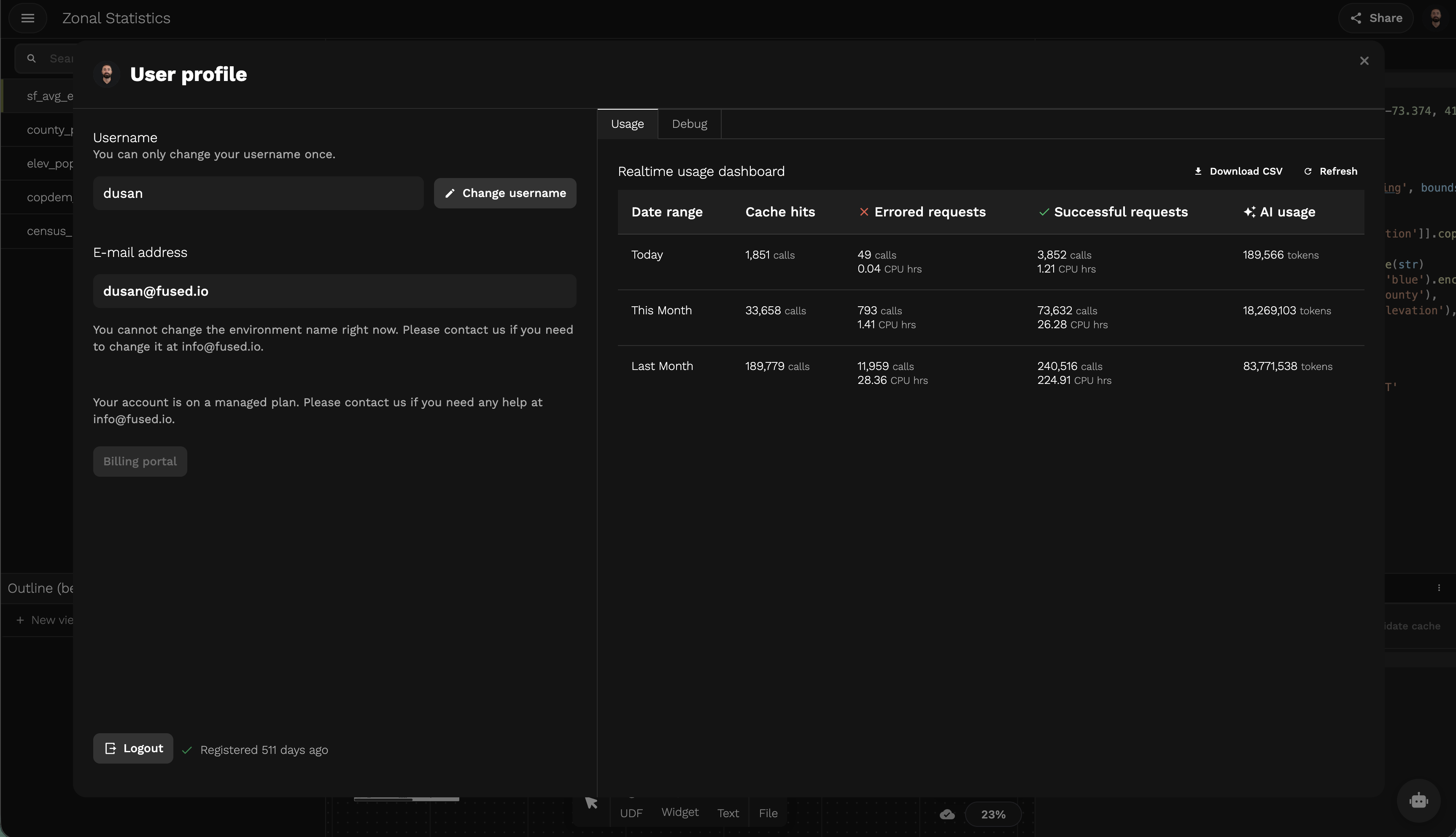
You can download the data as a CSV or refresh the dashboard at any time.
For details on plans and pricing, see the Fused pricing page.
Billing
You can upgrade your subscription tier directly from the Profile page. Upgrading gives you dedicated compute resources and higher usage limits. See Free Tier for details on what's included in the free plan, or visit the pricing page to compare plans.
Debug
The Debug tab provides diagnostic information useful for troubleshooting issues with Fused support.