Partition, Index and Query
Fused's H3 Data Retrieval Service turns your data into an H3 dataset that returns the rows you ask for in seconds. It takes three steps: partition, index and query. This page gives the best practices for each step and the ways to visualize the result, then an end to end example on Overture buildings.
Concepts
- Partition writes your data as H3 Parquet files, grouped into folders and files so a query can skip most of them.
- Index records the cells, partition values and time range each file covers. Query needs it.
- Query uses the index to read only the files a request needs, from a UDF running on Fused with
fused.h3.queryor over HTTP withGET /h3/query. - Resolution: H3 cells come in 16 sizes, and a higher resolution means smaller cells. Choose one from the size of your features with the Resolution Guide. New to H3? See Working with H3.
Prepare your data
Every row needs a location. fused.h3.partition reads it from one of two parameters, point_column or hex_column, set to the names of your columns:
- Latitude and longitude:
point_column=("lat", "lng"). - A geometry, such as polygons:
point_column="geometry", a WKB column. Each row gets the cell of its centroid. - An H3 cell:
hex_column="hex". The cells are kept as they are.
Pass only one. If you have both a cell column and a geometry, use hex_column. Coordinates must be longitude and latitude in degrees (EPSG:4326). Partition reads Parquet from a path or fused.h3.sources.parquet, or a UDF's output with fused.h3.sources.udf, not a DataFrame.
Partition
fused.h3.partition writes your rows as H3 Parquet files. It runs as background jobs and returns a run at once:
| To | Call |
|---|---|
| See the status | fused.h3.get_run(run_id) |
| Follow the logs | .tail() |
| Run the failed jobs again | .retry() |
In a UDF that starts a job, guard the call so it runs only when you ask: otherwise every re-run of the UDF starts the job again.
Resolutions
| Parameter | Sets | Default |
|---|---|---|
h3_res | The cell of each row | 7 |
file_res | The larger cell that each file covers | 1 |
Set both: the defaults suit few datasets. Choose h3_res from the size of your features with the Resolution Guide. A higher file_res makes more, smaller files, so a query reads less.
Partition columns
partition_by writes one folder per value of a column, so a query that filters on that column reads only its folders. Choose the column your queries filter on.
- Values cannot be null or empty, contain a
/, or start with_. - Avoid a column where one value holds most rows.
partition_by | Example | Runs |
|---|---|---|
| Column names | "building_type" | One job, which takes the values from the data. |
| A dict of values | {"date": ["2024-07-04", "2024-07-05"]} | One job per combination of values. Each job passes its value to the source's input of the same name: a UDF parameter, or a hive folder for sources.parquet. |
Engine
engine | Time limit | Use for |
|---|---|---|
"small" (default), "medium", "large" | None: they run as batch jobs | Most sources |
"realtime" | 2 minutes | Small Parquet sources only. A UDF source raises. |
Running again
partition_by | Running again into the same output |
|---|---|
| Column names | Replaces the folders it writes; the others stay. A UDF source reuses its cached rows unless you pass redo=True. |
| A dict of values | Runs only the values not done yet. redo=True reruns the values you pass. |
| Nothing | Raises. redo=True replaces the output. |
To change h3_res, file_res, fill, sort_by or the partition columns, write to a new path. run.retry() reruns failed jobs. Index again after every run.
Index
fused.h3.index registers the files with the query service. It returns a run at once; .tail() prints its logs until it finishes. Re-runs are incremental; redo=True indexes everything again.
- Re-run index after every partition, and wait until
fused.h3.index_statusreportsready. A partition run that rewrites files makes the index stale even when the data is the same, and queries fail until you index again. - New data: run index again. It indexes only new, changed and removed files and skips unchanged folders. On a large dataset, also pass the new folders as
subset=, such assubset={"<partition column>": "<value>"}, so index lists only those folders instead of the whole dataset. The keys must be the leading partition columns. - Use a batch engine for large datasets:
"small","medium"or"large". The default,"realtime", stops after 2 minutes, so a run with too many files to read fails at launch and names the engine to use.
Query
fused.h3.query returns the matching rows as a DataFrame. It runs only inside a UDF on Fused; anywhere else it raises a RuntimeError.
- Always give a place:
bbox=,cell=, orlat=andlng=. Without one, it returns the whole dataset. - Filter by partition values: one value or a list, such as
partition={"<partition column>": ["<value>", "<value>"]}. Only place, time and partition values are filtered; filter other columns on the returned DataFrame. - Request only the columns you use with
columns=. - Split a large result into smaller areas or time windows. The whole result is held in the UDF's memory, so one too large fails the job.
To query from outside a UDF, use GET /h3/query. It takes the same place and partition filters as query parameters, with an access token, and returns a Parquet file:
curl -G "https://www.fused.io/server/v1/h3/query" \
  -H "Authorization: Bearer $FUSED_ACCESS_TOKEN" \
  --data-urlencode "path=fd://overture_us_buildings/v1/h3/" \
  -d min_lng=-76.62 -d min_lat=39.285 -d max_lng=-76.6 -d max_lat=39.3 \
  --data-urlencode 'partition={"building_type": ["residential", "commercial"]}' \
  -o buildings.parquet
Limits and paging
- One response of rows holds one page: at most
max_row_groupsrow groups (default 1,024, at most 4,096) and at most 256 MiB of decoded rows, whichever comes first. The H3 cell column counts toward the 256 MiB even when you don't request it. fused.h3.querypages for you and returns every row, so the 256 MiB limit applies to each page, not to the result. The whole result still has to fit in the UDF's memory.
Visualize
A Fused Map draws an indexed dataset in three ways. Start with the fused-hex layer: it needs no code.
| Method | How the map gets the rows | Use it to |
|---|---|---|
fused-hex layer | The layer fetches the cells in view as you pan and zoom, with no UDF. | Browse the whole dataset. |
| From a UDF | A UDF calls fused.h3.query and an h3 layer draws what it returns. | Join, aggregate or filter other columns in Python first. |
h3-query widget and a map | An h3-query widget fetches the rows of one query as a SQL source, {{name}}, and a map layer draws them. | Run SQL, charts and tables on the rows, and cross-filter a map with a histogram. |
H3 Visualization has the code and a live canvas for each. Every prop is in the Fused Map and H3 Query widget references. The example below maps Overture buildings from a UDF and with a fused-hex layer.
End to End Example with Overture Buildings
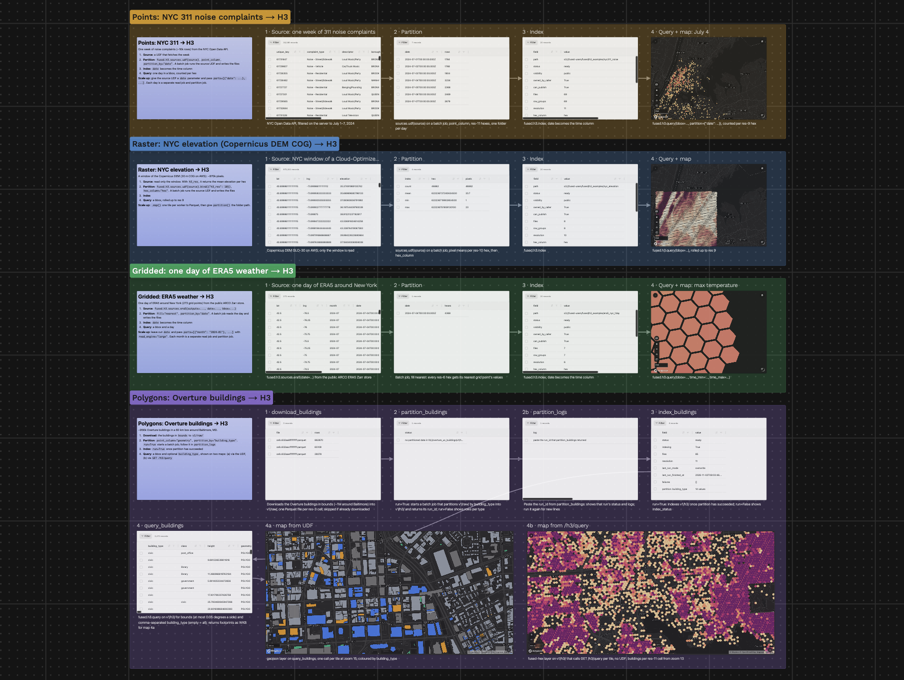
The H3_End_to_End_Ingestion canvas has four examples: NYC 311, Copernicus DEM, ERA5 and Overture buildings. Open it to run any of them.
This section walks through the Polygons: Overture buildings → H3 group. In it, we download 955,857 Overture building footprints around Baltimore, Maryland, once, partition them into H3 files by building type, index them, then query them from a map: once through a UDF and once straight from GET /h3/query. The UDFs that start partition and index jobs are guarded by a run parameter, so they only start a job when it is turned on.
- Source: Overture buildings, release
2026-04-15-0, Fused's copy on Source Cooperative - Area: 60 km × 60 km around Baltimore,
(-76.96, 39.02, -76.26, 39.56)(west, south, east, north), passed asbounds - Settings:
h3_res=11,file_res=4,partition_by="building_type"; seefused.h3.partition
1. Download: download_buildings
Overture has no query API, so the UDF reads each part's _metadata, downloads only the chunks that overlap the box, and keeps the buildings whose centre is inside it. Most Overture buildings have no type, and partition values cannot be null, so a missing type becomes building_type="unknown". The buildings are saved to Fused storage as GeoParquet, one file per res-3 cell, together with the box and release they came from: running the UDF again with the same values skips the download.
Returns: 3 files with 862,670, 65,109 and 28,078 buildings, in about 30 seconds.
2. Partition: partition_buildings
The rows have a geometry and no cell column, so partition reads them with fused.h3.sources.parquet and gives each building the cell of its centroid at res 11, about 25 m across (see the Resolution Guide). Res 4 groups the files.
job = fused.h3.partition(
    fused.h3.sources.parquet("fd://overture_us_buildings/v1/raw/"),
    "fd://overture_us_buildings/v1/h3/",
    point_column="geometry",
    h3_res=11,
    file_res=4,
    partition_by="building_type",
    engine="realtime",
)
The source is small, so the job runs on "realtime" with no machine to start. fused.h3.get_run(job.id) gives its status, and .tail() its logs. A second run reads the source again and replaces only the building_type folders it writes; see Running again.
Writes: one folder per building_type and one file per res-4 cell. Every row has hex at res 11 and the source columns.
h3/
├── building_type=residential/
│   ├── 842aa81ffffffff.parquet    one file per res-4 cell
│   └── ...
├── building_type=unknown/
│   └── ...
└── ...                            14 building_type folders, 85 files
3. Index: index_buildings
The UDF runs fused.h3.index with redo=True, so every run indexes all files again. It follows the run to the end, then shows fused.h3.index_status.
path = "fd://overture_us_buildings/v1/h3/"
fused.h3.index(path, redo=True).tail()
status = fused.h3.index_status(path)
Returns: indexing takes about 4 seconds. Then status is a dict with status 'ready', files 85, resolution 11 and partition_columns building_type (14 values).
4. Query: query_buildings
The UDF calls fused.h3.query and returns the buildings inside bounds for the types in building_type (comma-separated; empty means all), as a DataFrame with the geometry as WKB. It refuses boxes wider than 0.05 degrees, so a map never asks for all 1M buildings.
@fused.udf
def udf():
    return fused.h3.query(
        "fd://overture_us_buildings/v1/h3/",
        bbox=(-76.62, 39.285, -76.6, 39.3),
        partition={"building_type": ["residential", "commercial"]},
        columns=["building_type", "class", "height", "geometry"],
    )
Returns: 301 rows, 163 commercial and 138 residential. With every type, the same box returns 2,470 rows in about 1 second.
Two maps show the result:
- 4a. Map from the UDF: a
fused-maplayer runsquery_buildingsonce per map tile from zoom 15, so panning queries the new area, and colours footprints bybuilding_type. - 4b. Map from
/h3/query: afused-hexlayer callsGET /h3/queryper tile with no UDF, from zoom 13, and colours each res-11 cell by its number of buildings. It cannot filter bybuilding_type.
{
  "type": "fused-hex",
  "h3Column": "hex",
  "minZoom": 13,
  "source": {"path": "fd://overture_us_buildings/v1/h3/", "variables": ["height"], "reduce": "sum"}
}
To use another area, change bounds in step 1, partition into a new output path, index that path, and point the query UDF and the fused-hex layer at it. A re-run into the same path would keep any building_type folder the new area does not write.
Reference
- H3 Data Retrieval Service: the workflow at a glance
- H3 Visualization: map an indexed dataset
- H3 large datasets
fused.h3: the Python APIGET /h3/query: every parameter- Resolution Guide
- Raster ingestion pipeline
- H3_End_to_End_Ingestion canvas