Handling Large Remote Files
You might want to work with datasets that:
- Aren't available through an API
- Are too large to be simply dragged & dropped into Fused
Example use cases, downloading large files from remote sources like:
This page shows you how to work with such files in Fused
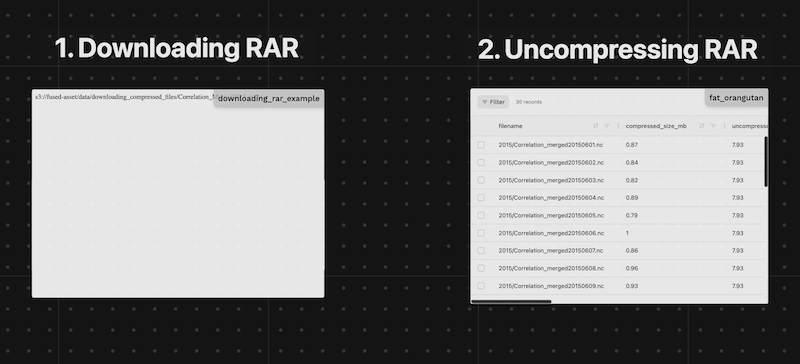
Download Large Files to Fused
We provide here an example of a UDF that downloads a file from a remote source and uploads it to Fused managed S3.
Steps:
- Get the URL of the file you want to download
In our example we will use a Soil Moisture dataset from Zenodo
url = https://zenodo.org/records/4395621/files/Correlation_Merged1998_nc2.rar
- (Optional) If you estimate the file will take more than 100s to download, run the following UDF as a batch job
Here we chose a c2-standard-4 instance type, i.e. the smallest instance type Fused supports as downloading a file doesn't require heavy resources we simply need a UDF that can run for minutes or hours while we download, beyond the 120s timeout of realtime UDFs
@fused.udf(
    instance_type='c2-standard-4',  # We only need a small instance type. Download takes long time, but uses little resources.
    disk_size_gb=999                # Setting up large amount of disk to have enough to save our file
)
def udf():
    # Rest of code
    ...
We can now write a relatively simple UDF to download a file to an S3 bucket of our choosing:
@fused.udf(
    instance_type='c2-standard-4',
    disk_size_gb=999
)
def udf():
    """Downloads a zip file to Fused managed S3"""
    import s3fs
    import requests
    import os, tempfile

    url = "https://zenodo.org/records/4395621/files/Correlation_Merged1998_nc2.rar?download=1"
    s3_path = f"s3://fused-asset/data/downloading_compressed_files/{url.split('/')[-1]}" # <- Update to your fused S3 path
    if s3fs.S3FileSystem().exists(s3_path):
        return f'File exists: {s3_path}'

    temp_path = tempfile.NamedTemporaryFile(delete=False, suffix=os.path.splitext(url.split('/')[-1])[1]).name
    resp = requests.get(url, stream=True)
    resp.raise_for_status()
    total_size = int(resp.headers.get('Content-Length', 0))
    size_mb = total_size / (1024 * 1024)
    print(f"Download file size: {size_mb:.2f} MB")

    with open(temp_path, 'wb') as f:
        for i, chunk in enumerate(resp.iter_content(chunk_size=total_size//100)):
            print(f'{i}% | {round(size_mb*i/100,1)}/{round(size_mb)} MB')
            f.write(chunk)

    print(f"Done Downloading. Uploading the file to s3.")
    import s3fs
    s3 = s3fs.S3FileSystem()
    s3.put(temp_path, s3_path)
    print(f"Uploaded to: {s3_path}")
(For smaller files) Check out this realtime UDF downloading individual ship transponder AIS signal to S3 directly from NOAA
Work with compressed formats
Once files are downloaded to Fused we need to open them. The following sections provide 2 examples of how to open compressed files.
RAR
Step 1: List available files in the archive
Some archives can have a large number of files and we might only need a subset, exploring files first allows to only retrieve the ones we need:
@fused.udf
def udf():
    import pandas as pd
    rar_url = "s3://fused-asset/data/downloading_compressed_files/Correlation_Merged2015_nc2.rar"
    return get_rar_file_info(rar_url)


@fused.cache
def get_rar_file_info(url):
    """Get file information from RAR archive similar to get_zip_file_info"""
    import pandas as pd
    import rarfile
    import s3fs

    s3 = s3fs.S3FileSystem()
    with s3.open(url, "rb") as f:
        with rarfile.RarFile(f) as rar_ref:
            file_list = rar_ref.namelist()
            file_info = []
            for filename in file_list:
                info = rar_ref.getinfo(filename)
                file_info.append(
                    {
                        "filename": filename,
                        "compressed_size_mb": round(info.compress_size / (1024 * 1024), 2),
                        "uncompressed_size_mb": round(info.file_size / (1024 * 1024), 2),
                    }
                )
    return pd.DataFrame(file_info)
| filename | compressed_size_mb | uncompressed_size_mb | |
|---|---|---|---|
| 0 | 2015/Correlation_merged20151222.nc | 0.0 | 7.93 |
| 1 | 2015/Correlation_merged20151223.nc | 0.0 | 7.93 |
| 2 | 2015/Correlation_merged20151224.nc | 0.0 | 7.93 |
| 3 | 2015/Correlation_merged20151225.nc | 0.0 | 7.93 |
| 4 | 2015/Correlation_merged20151226.nc | 0.0 | 7.93 |
Step 2: Extract the files
The above files represent daily soil moisture data. Let's say we only wanted the June files:
@fused.udf
def udf():
    import pandas as pd

    rar_url = "s3://fused-asset/data/downloading_compressed_files/Correlation_Merged2015_nc2.rar"

    df_files = get_rar_file_info(rar_url)
    print(df_files.T)

    # Filter for files containing 'Correlation_merged201506' in filename
    df_files = df_files[df_files['filename'].str.contains('Correlation_merged201506')]
    return df_files
We can then download only these files to another directory:
extract_file_from_rarsimple function that downloads a single file from the archiveudf_rar_to_filewrapping this function into a UDF- Using
fused.submit()to run the UDF in parallel.- We use
engine='local'so all jobs are run in the current UDF. Setting this toremotewould spin up more Fused instances. Given our job is relatively small in this case, no need, we can save on compute costs like this.
- We use
Read more about UDF execution engines here
@fused.udf
def udf():
    import pandas as pd

    rar_url = "s3://fused-asset/data/downloading_compressed_files/Correlation_Merged2015_nc2.rar"
    output_base = "s3://fused-asset/data/downloading_compressed_files/Correlation_Merged2015_nc2/" # <- change this path to yours

    df_files = get_rar_file_info(rar_url)

    # Filter for files containing 'Correlation_merged201506' in filename
    df_files = df_files[df_files['filename'].str.contains('Correlation_merged201506')]
    df_files["output_path"] = df_files.filename.map(lambda x: output_base + x.split("/")[-1])
    df_files["input_path"] = rar_url

    output_path = fused.submit(
        udf_rar_to_file,
        df_files[["filename", "input_path", "output_path"]],
        engine='local', # local engine means this won't spin up more Fused instances, it will all run in the current UDF
    )

    return output_path

@fused.udf
def udf_rar_to_file(input_path, filename, output_path):
    print(f"Processing: {filename=} - Saving to : {output_path=} ({input_path=})")
    output_path = extract_file_from_rar(
        input_path,
        filename,
        output_path
    )
    return output_path

@fused.cache
def extract_file_from_rar(url, filename, output_path):
    """Extract a specific file from RAR archive using chunked streaming to avoid OOM"""
    import rarfile
    import os
    import tempfile
    import s3fs

    s3 = s3fs.S3FileSystem()

    # Create temp file upfront for streaming
    with tempfile.NamedTemporaryFile(
        mode="wb", delete=False, suffix=os.path.splitext(filename)[1]
    ) as output_file:
        temp_path = output_file.name

        # Stream in 100MB chunks to avoid loading entire file into RAM
        CHUNK_SIZE = 100 * 1024 * 1024  # 100MB chunks
        total_bytes = 0

        with s3.open(url, "rb") as f:
            with rarfile.RarFile(f) as rar_ref:
                with rar_ref.open(filename) as file:
                    while True:
                        chunk = file.read(CHUNK_SIZE)
                        if not chunk:
                            break
                        output_file.write(chunk)
                        total_bytes += len(chunk)
                        print(f"Processed {total_bytes / (1024 * 1024):.1f} MB...")

    print(f"Completed extraction: {total_bytes / (1024 * 1024):.1f} MB total")

    # Upload the fully written temp file
    s3.put(temp_path, output_path)
    print(f"Uploaded to: {output_path}")
    return output_path

@fused.cache
def get_rar_file_info(url):
    """Get file information from RAR archive similar to get_zip_file_info"""
    import pandas as pd
    import rarfile
    import s3fs

    s3 = s3fs.S3FileSystem()
    with s3.open(url, "rb") as f:
        with rarfile.RarFile(f) as rar_ref:
            file_list = rar_ref.namelist()
            file_info = []
            for filename in file_list:
                info = rar_ref.getinfo(filename)
                file_info.append(
                    {
                        "filename": filename,
                        "compressed_size_mb": round(info.compress_size / (1024 * 1024), 2),
                        "uncompressed_size_mb": round(info.file_size / (1024 * 1024), 2),
                    }
                )
    return pd.DataFrame(file_info)
ZIP
Step 1: List available files in the archive
@fused.udf
def udf():
    import pandas as pd

    # ZIP file path
    zip_url = "s3://fused-asset/data/downloading_compressed_files/WorldCereal_2021_tc-maize-second_irrigation_confidence.zip"
    return get_zip_file_info(zip_url)


@fused.cache
def get_zip_file_info(url):
    """Get file information from ZIP archive"""
    import pandas as pd
    import zipfile
    import s3fs

    s3 = s3fs.S3FileSystem()
    with s3.open(url, "rb") as f:
        with zipfile.ZipFile(f) as zip_ref:
            file_list = zip_ref.namelist()
            file_info = []
            for filename in file_list:
                info = zip_ref.getinfo(filename)
                file_info.append(
                    {
                        "filename": filename,
                        "compressed_size_mb": round(info.compress_size / (1024 * 1024), 2),
                        "uncompressed_size_mb": round(info.file_size / (1024 * 1024), 2),
                    }
                )
    return pd.DataFrame(file_info)
Step 2: Extract the files
Filter for specific files and download them to another directory:
@fused.udf
def udf():
    import pandas as pd

    zip_url = "s3://fused-asset/data/downloading_compressed_files/WorldCereal_2021_tc-maize-second_irrigation_confidence.zip"
    output_base = "s3://fused-asset/data/downloading_compressed_files/WorldCereal_extracted/" # <- change this path to yours

    df_files = get_zip_file_info(zip_url)

    # Filter for specific files (e.g., .tif files)
    df_files = df_files[df_files['filename'].str.endswith('.tif')]
    df_files["output_path"] = df_files.filename.map(lambda x: output_base + x.split("/")[-1])
    df_files["input_path"] = zip_url

    output_path = fused.submit(
        udf_zip_to_file,
        df_files[["filename", "input_path", "output_path"]],
        engine='local', # local engine means this won't spin up more Fused instances, it will all run in the current UDF
    )

    return output_path

@fused.udf
def udf_zip_to_file(input_path, filename, output_path):
    print(f"Processing: {filename=} - Saving to : {output_path=} ({input_path=})")
    output_path = extract_file_from_zip(
        input_path,
        filename,
        output_path
    )
    return output_path

@fused.cache
def extract_file_from_zip(url, filename, output_path):
    """Extract a specific file from ZIP archive using chunked streaming to avoid OOM"""
    import zipfile
    import os
    import tempfile
    import s3fs

    s3 = s3fs.S3FileSystem()

    # Create temp file upfront for streaming
    with tempfile.NamedTemporaryFile(
        mode="wb", delete=False, suffix=os.path.splitext(filename)[1]
    ) as output_file:
        temp_path = output_file.name

        # Stream in 100MB chunks to avoid loading entire file into RAM
        CHUNK_SIZE = 100 * 1024 * 1024  # 100MB chunks
        total_bytes = 0

        with s3.open(url, "rb") as f:
            with zipfile.ZipFile(f) as zip_ref:
                with zip_ref.open(filename) as file:
                    while True:
                        chunk = file.read(CHUNK_SIZE)
                        if not chunk:
                            break
                        output_file.write(chunk)
                        total_bytes += len(chunk)
                        print(f"Processed {total_bytes / (1024 * 1024):.1f} MB...")

    print(f"Completed extraction: {total_bytes / (1024 * 1024):.1f} MB total")

    # Upload the fully written temp file
    s3.put(temp_path, output_path)
    print(f"Uploaded to: {output_path}")
    return output_path

@fused.cache
def get_zip_file_info(url):
    """Get file information from ZIP archive"""
    import pandas as pd
    import zipfile
    import s3fs

    s3 = s3fs.S3FileSystem()
    with s3.open(url, "rb") as f:
        with zipfile.ZipFile(f) as zip_ref:
            file_list = zip_ref.namelist()
            file_info = []
            for filename in file_list:
                info = zip_ref.getinfo(filename)
                file_info.append(
                    {
                        "filename": filename,
                        "compressed_size_mb": round(info.compress_size / (1024 * 1024), 2),
                        "uncompressed_size_mb": round(info.file_size / (1024 * 1024), 2),
                    }
                )
    return pd.DataFrame(file_info)
Other formats
You can follow a similar pattern:
- Download the file to a Fused managed S3 bucket
- List available files in the archive
- Extract the files
Next Steps
Once you've downloaded your files you might want to:
- Ingest raster files into H3 hexagons
- Visualize your data in Fused
- Create a standalone map sharable outside of Fused